SCD40 / SCD41 with ESP32: CO₂ Monitor & I2C Setup
Start periodic SCD4x measurements, check data-ready status and read CO2, temperature and humidity using Sensirion’s driver.
On this page
Confirm SCD40 versus SCD41Prepare a reliable supplyWire the 0x62 I2C deviceInstall the manufacturer driverStart periodic CO2 measurementsInterpret the first samplesTroubleshootingReferences and further readingRelated product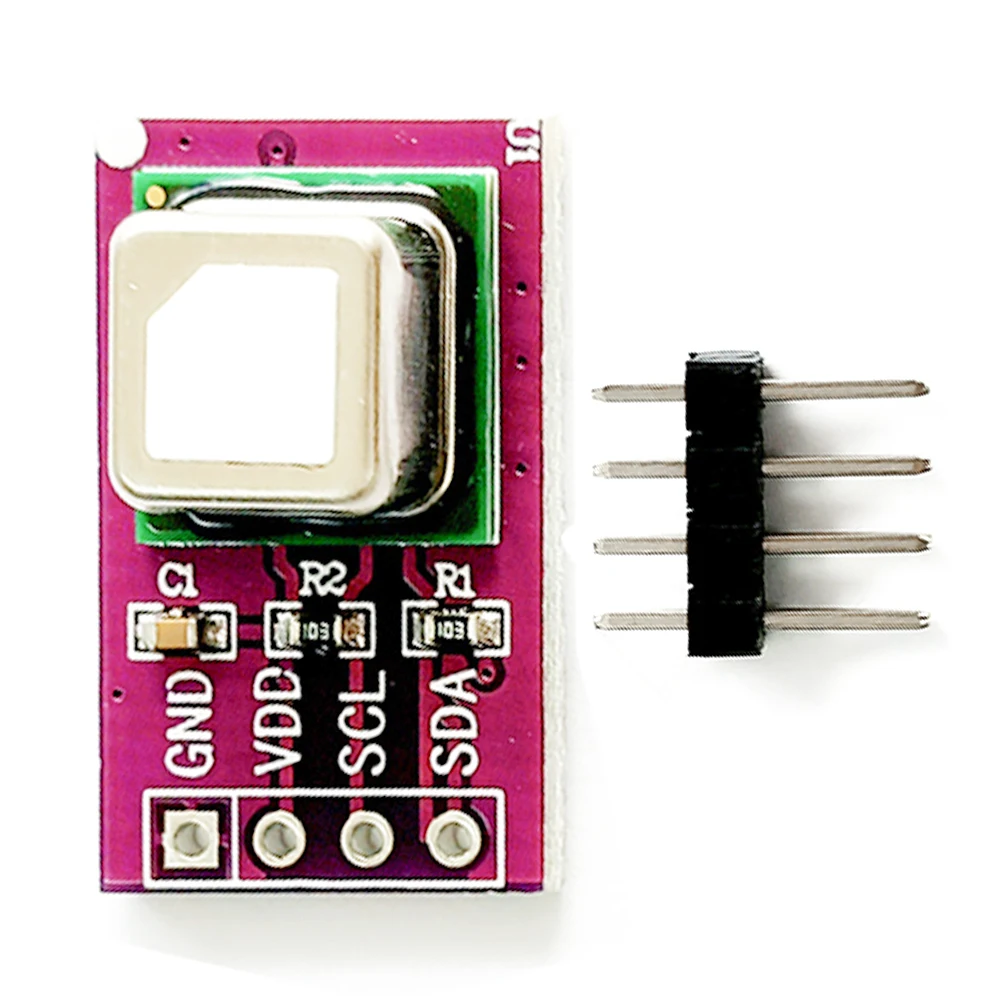
Build a first CO₂ monitor using an SCD40 or SCD41 breakout and an ESP32. The example starts periodic measurement, waits for a new sample and prints CO₂ concentration together with the sensor's temperature and humidity readings.
Confirm SCD40 versus SCD41
Check the selected product variant and actual sensor marking. The two devices share the basic I2C periodic-reading workflow, but their specified accuracy, range and supported low-power modes differ. This tutorial uses the common periodic mode; it does not assume that every SCD41-only command is available on an SCD40.
Prepare a reliable supply
The example controller is an ESP32-C3 Supermini with free, exposed GPIO6 and GPIO7. First confirm that its serial/upload test works. Select ESP32C3 Dev Module and enable USB CDC On Boot for native USB. Open Serial Monitor at 115200 baud. Disconnect power before changing wires.
The listed breakout exposes VDD, GND, SCL and SDA. Use a stable 3.3 V supply within its stated ratings and account for measurement current peaks when choosing the controller supply. A regulator that works with a tiny I2C sensor may still need checking with a CO₂ module.
Wire the 0x62 I2C device
| Module label | ESP32-C3 Supermini | Connection |
|---|---|---|
| VDD | 3V3 | 3.3 V for this example |
| GND | GND | Common ground |
| SDA | GPIO6 | I2C data |
| SCL | GPIO7 | I2C clock |
These are explicitly assigned GPIO numbers for this C3 example, not physical header positions or universal ESP32 defaults. For another controller, choose free pins from its own pinout and change Wire.begin() in the sketch. Keep the first test on short wires with one peripheral.
The SCD4x address is 0x62. If a scanner does not find it, correct wiring and power before debugging the measurement command sequence. Check the breakout's pull-ups; keep ESP32 I2C levels at 3.3 V even when another board supports a higher supply voltage.
Install the manufacturer driver
In Arduino Library Manager install Sensirion I2C SCD4x and Sensirion Core. Accept the listed dependencies. Create a new sketch, paste the complete example, click Verify, then Upload. Keep a record of your board profile and library versions when reporting an issue.
The current API header is SensirionI2cScd4x.h. Older library versions and third-party examples can use different class names. This sketch assumes a freshly powered sensor; power-cycle it first if another program left an SCD41 in power-down mode.
Start periodic CO2 measurements
Upload the complete sketch. It stops an existing periodic session before starting a new one, then checks the data-ready status once a second. Normal periodic samples arrive approximately every five seconds, so an empty first few seconds is expected.
#include <Arduino.h>
#include <Wire.h>
#include <SensirionI2cScd4x.h>

SensirionI2cScd4x air;
void setup() {
  Serial.begin(115200);
  delay(1500);
  Wire.begin(6, 7);
  Wire.setClock(100000);
  air.begin(Wire, 0x62);
  // Assumes a freshly powered sensor, not one left in power-down mode.
  air.stopPeriodicMeasurement();
  delay(500);
  const int16_t error = air.startPeriodicMeasurement();
  if (error != 0) {
    Serial.printf("Start failed: %d\n", (int)error);
    while (true) delay(1000);
  }
}
void loop() {
  delay(1000);
  bool ready = false;
  int16_t error = air.getDataReadyStatus(ready);
  if (error != 0) { Serial.printf("Ready check failed: %d\n", (int)error); return; }
  if (!ready) return;
  uint16_t ppm = 0;
  float celsius = 0, humidity = 0;
  error = air.readMeasurement(ppm, celsius, humidity);
  if (error != 0 || ppm == 0) {
    Serial.printf("No valid sample yet (error %d).\n", (int)error);
    return;
  }
  Serial.printf("CO2: %u ppm | Temperature: %.2f C | Humidity: %.2f %%RH\n",
                (unsigned)ppm, celsius, humidity);
}
Interpret the first samples
- Leave the sensor in representative room air and allow it to stabilize.
- Watch CO₂ trends over several measurement cycles rather than using a single number.
- Keep the sensor away from the ESP32's local heat when evaluating temperature and humidity.
- Compare a reference instrument in the same location before changing compensation or calibration settings.
Do not perform forced recalibration using an assumed indoor CO₂ value. Keep calibration settings unchanged for the initial test and use Sensirion's procedure when a real reference is available. The zero-ppm check in the sketch discards a sample that is not ready to use; it is not an instruction to treat zero as clean air.
Troubleshooting
| Symptom | Check next |
|---|---|
| No I2C address | Recheck VDD, common ground, SDA/SCL and supply under measurement load. |
| No readings immediately after reset | Allow the first periodic measurement interval; verify the data-ready flag. |
| Start command fails | Power-cycle the sensor, check the driver version and address, and retry the minimal sketch. |
| SCD41-only low-power example fails on SCD40 | Use the common periodic workflow shown here and confirm the model before trying other modes. |
| Unexpected temperature or CO2 baseline | Check placement, stabilization, ventilation history and manufacturer compensation guidance before recalibrating. |
References and further reading
- Sensirion SCD4x Arduino driver
- Current SCD4x API
- SCD40 product guidance
- SCD41 product guidance
- ESP32 I2C API
Related product
Share the product link, hardware revision, software version and any error messages.
Contact ESP32S support →