TCA9548A with ESP32: Multiple Same-Address I2C Devices
Wire the upstream and downstream buses, scan each channel and keep identical-address sensors isolated during transactions.
On this page
Understand what a multiplexer changesPrepare the first channelWire upstream and downstream separatelySelect channels using WireScan all eight channelsAdd two devices with the same addressTroubleshootingReferences and next stepsRelated product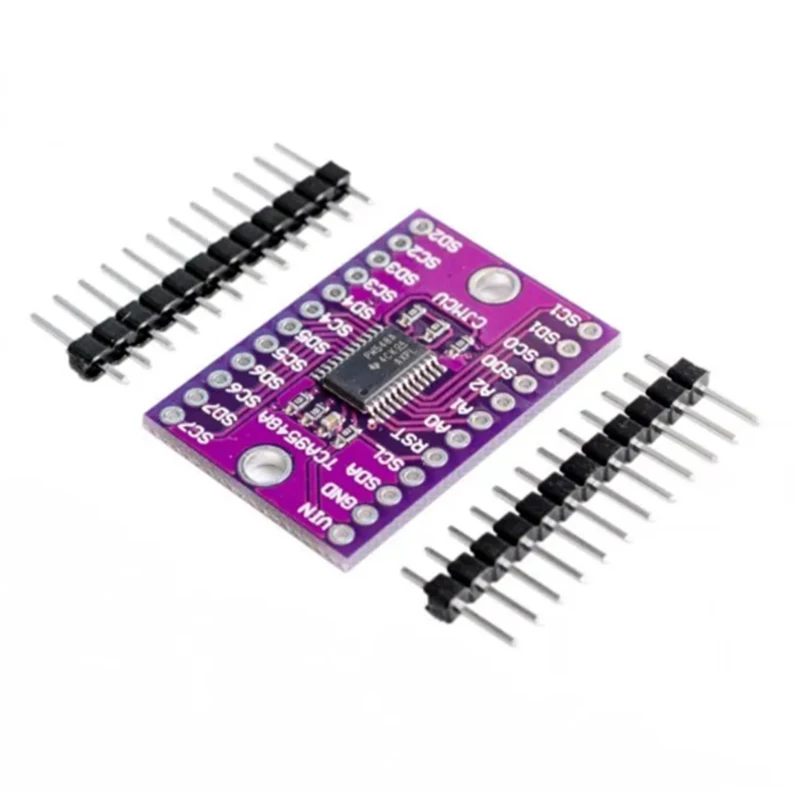
Use the TCA9548A to connect I2C peripherals that share an address. The first test selects one downstream channel at a time and scans it, keeping the wiring and software selection visible before adding device-specific drivers.
Understand what a multiplexer changes
The TCA9548A switches connections between one upstream I2C bus and eight downstream channel pairs. A peripheral keeps its own address; the multiplexer does not rewrite it. Two same-address devices remain isolated only while the channel selection avoids connecting them together.
Prepare the first channel
The controller for this example is an ESP32-C3 Supermini. Confirm that its USB upload and serial test works before adding the module. Use ESP32C3 Dev Module with USB CDC On Boot enabled for native USB, and open Serial Monitor at 115200 baud. Disconnect power while changing wires.
Use one peripheral that already works directly on the controller. Keep the first experiment entirely at 3.3 V. Mixed-voltage use requires checking each bus segment's pull-ups and device ratings; a multiplexer is not a reason to ignore ESP32 GPIO voltage limits.
Wire upstream and downstream separately
| Module label | ESP32-C3 example | Purpose |
|---|---|---|
| VCC / VIN | 3V3 | 3.3 V logic supply for this setup |
| GND | GND | Common ground |
| SDA | GPIO6 | I2C data |
| SCL | GPIO7 | I2C clock |
GPIO6 and GPIO7 are explicit assignments for this C3 example. They are not physical header positions or universal ESP32 defaults. For another board, select free exposed pins using its own pinout and update Wire.begin(). Keep ESP32 I2C pull-ups at 3.3 V.
| Downstream side | Connection |
|---|---|
| SD0 / SDA0 | Sensor SDA on channel 0 |
| SC0 / SCL0 | Sensor SCL on channel 0 |
| Sensor power and ground | Its rated supply and the common return |
| Other channel pairs | Leave unconnected until channel 0 is verified |
Check the address straps and inactive-high RESET arrangement on the actual breakout. The common starting address is 0x70, selectable within 0x70–0x77. An address scan with all channels disconnected is useful for locating the multiplexer itself.
Select channels using Wire
No extra library is required for this example. A control-byte bit selects a channel: 1U << 0 selects channel 0, 1U << 1 selects channel 1, and a zero byte disconnects all channels. The sketch deliberately uses only one bit at a time.
Set MUX_ADDRESS to the actual upstream address. Keep controller-facing peripherals out of the initial test so the scan result is easy to interpret.
Scan all eight channels
Move the known sensor between channel 0 and channel 1 with power disconnected. Its responding address should follow the wiring. The scan skips the multiplexer's own address because that address remains visible upstream.
#include <Arduino.h>
#include <Wire.h>

constexpr uint8_t MUX_ADDRESS = 0x70; // Match the board's actual address straps.
bool selectMask(uint8_t mask) {
  Wire.beginTransmission(MUX_ADDRESS);
  Wire.write(mask);
  return Wire.endTransmission() == 0;
}
void setup() {
  Serial.begin(115200);
  delay(1500);
  Wire.begin(6, 7);
  Wire.setClock(100000);
  if (!selectMask(0)) {
    Serial.println("TCA9548A not found; check 0x70-0x77 and wiring.");
    while (true) delay(1000);
  }
}
void loop() {
  for (uint8_t channel = 0; channel < 8; ++channel) {
    if (!selectMask((uint8_t)(1U << channel))) {
      Serial.println("Channel selection failed.");
      continue;
    }
    Serial.printf("Channel %u:\n", (unsigned)channel);
    for (uint8_t address = 1; address < 127; ++address) {
      if (address == MUX_ADDRESS) continue;
      Wire.beginTransmission(address);
      if (Wire.endTransmission() == 0) Serial.printf("  0x%02X\n", address);
    }
  }
  selectMask(0); // Disconnect all downstream channels after this pass.
  delay(3000);
}
Add two devices with the same address
- Verify the first peripheral on channel 0.
- Put the second same-address peripheral on channel 1 and scan again.
- Select channel 0 immediately before initializing or reading its device.
- Select channel 1 immediately before initializing or reading the other device.
Device libraries may keep configuration state in separate objects, but selecting an object does not automatically select a TCA9548A channel. Also remember that a device wired directly upstream can appear in every channel scan. Keep upstream addresses from conflicting with active downstream devices.
Troubleshooting
| Symptom | What to check |
|---|---|
| Multiplexer not found | Check power, RESET level, address straps and the upstream SDA/SCL pair. |
| Mux found, sensor absent | Check the selected bit, matching SDn/SCn pair, sensor power and downstream pull-ups. |
| Two same-address devices give strange readings | Enable only one of their channels for each transaction. |
| One address appears on every channel | Check for a peripheral connected upstream rather than behind the mux. |
| Bus becomes stuck after adding a module | Return to one channel and inspect wiring/pull-ups; use the documented RESET behavior if needed. |
References and next steps
Related product
TCA9548A 1-to-8 I2C 8 -way multi-channel expansion board IIC module development board →
Share the product link, hardware revision, software version and any error messages.
Contact ESP32S support →