DHT22 / AM2302 with ESP32: Wiring & Arduino Readings
Connect the DHT22 data line, check its pull-up and read temperature and humidity without confusing it with an I2C sensor.
On this page
Identify the module and signal pinPrepare the ESP32Wire power, data and the pull-upInstall the DHT libraryUpload a temperature and humidity testCheck readings and placementTroubleshootingReferences and further readingRelated product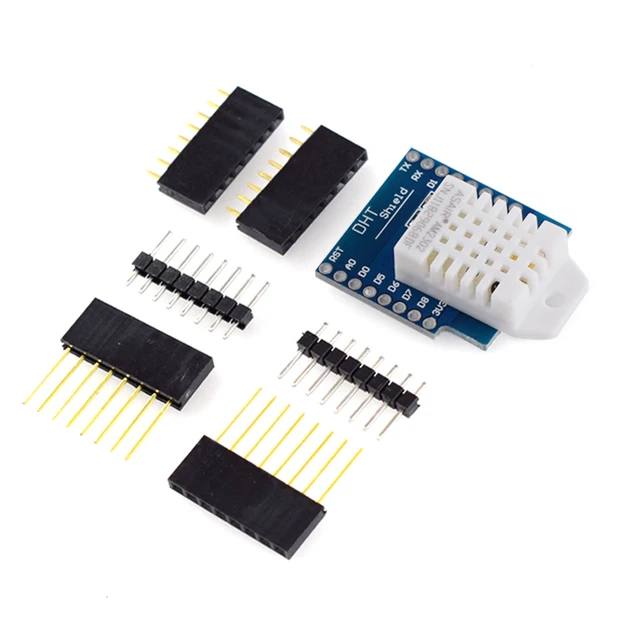
Read room temperature and relative humidity from the DHT22 / AM2302 module using an ESP32. This is a digital single-data-line sensor; it does not appear in an I2C address scanner.
Identify the module and signal pin
The linked product includes PCB and D1-mini-style options. Read the actual VCC, DATA and GND markings before connecting it. A bare four-pin sensor and a three-pin breakout do not share a universal left-to-right connector order. Select DHT22 in the code for an AM2302/DHT22 device, not DHT11.
Prepare the ESP32
Use a working ESP32-C3 Supermini, a USB data cable and short jumper wires. The example selects GPIO4 as the data pin and uses 3.3 V supply and logic. For a different board, choose a free exposed GPIO and update DATA_PIN. Keep the sensor away from the USB regulator and the ESP32 package when checking room-air readings.
Wire power, data and the pull-up
| DHT22 module label | ESP32-C3 example | Note |
|---|---|---|
| VCC / + | 3V3 | Use the listed 3.3 V module configuration |
| GND / − | GND | Common return |
| DATA / OUT | GPIO4 | One signal line; not I2C SDA |
| DATA pull-up | To 3V3 | Usually 4.7–10 kΩ if not already fitted |
Inspect whether the breakout already includes a data pull-up before adding another. If it is a plug-on D1 mini shield, confirm its signal route first; do not plug that footprint onto an unrelated ESP32 header. On an ESP8266 D1 mini, the printed D labels differ from GPIO numbers.
Install the DHT library
In Arduino Library Manager install DHT sensor library by Adafruit and Adafruit Unified Sensor. Accept the listed dependencies. Create a new sketch, paste the complete example, click Verify, then Upload. Keep a record of your board profile and library versions when reporting an issue.
Keep the DHT22 type selected even if the enclosure is marked AM2302. A library for an AHT20, SHT4x or another I2C humidity sensor uses a different protocol and will not read this sensor.
Upload a temperature and humidity test
The loop waits 2.5 seconds between readings. Do not remove this delay to make the display update faster: the DHT22 has a slow measurement cycle. Failed reads are checked before numbers are printed.
#include <Arduino.h>
#include <DHT.h>

constexpr int DATA_PIN = 4; // GPIO4, not a D1-mini D-number.
DHT climate(DATA_PIN, DHT22);
void setup() {
  Serial.begin(115200);
  climate.begin();
}
void loop() {
  delay(2500);
  const float humidity = climate.readHumidity();
  const float celsius = climate.readTemperature();
  if (isnan(humidity) || isnan(celsius)) {
    Serial.println("DHT read failed; check sensor type, pull-up and wiring.");
  } else {
    Serial.printf("Temperature: %.1f C | Humidity: %.1f %%RH\n", celsius, humidity);
  }
}
Check readings and placement
- Open Serial Monitor at 115200 baud and wait for several successful samples.
- Let the sensor settle after handling before comparing it with a reference.
- Record both instruments in the same place and out of direct sunlight.
- If readings are consistently warm, move the sensor away from the controller and enclosure heat.
This example reads Celsius and percent relative humidity. Short-term variations do not establish a calibration error. If you need an I2C sensor for a larger bus, continue with the separate AHT20 guide rather than trying to change the DHT communication protocol.
Troubleshooting
| Symptom | Check next |
|---|---|
| Repeated failed reads / NaN | Check sensor type, data pin, pull-up, power and ground. |
| Works at first, then becomes unreliable | Keep the read interval at least two seconds and check wiring length and connections. |
| No device in I2C scan | Expected: the DHT22 does not use I2C. |
| Works on D1 mini but not ESP32 | Translate the shield's D label to the actual GPIO and update DATA_PIN. |
| Temperature rises inside enclosure | Move the sensor into representative airflow and away from local heat. |
References and further reading
Related product
Share the product link, hardware revision, software version and any error messages.
Contact ESP32S support →