APDS9960 with ESP32: I2C Gesture Recognition
Check IR-LED power, enable proximity-assisted gestures and recognize four directions using the GY-9960 module.
On this page
Identify the APDS9960 breakoutPrepare the ESP32 and optical environmentConnect I2C and check IR-LED powerInstall the gesture driverRead hand gesturesMap recognition to your applicationTroubleshootingReferences and next stepsRelated product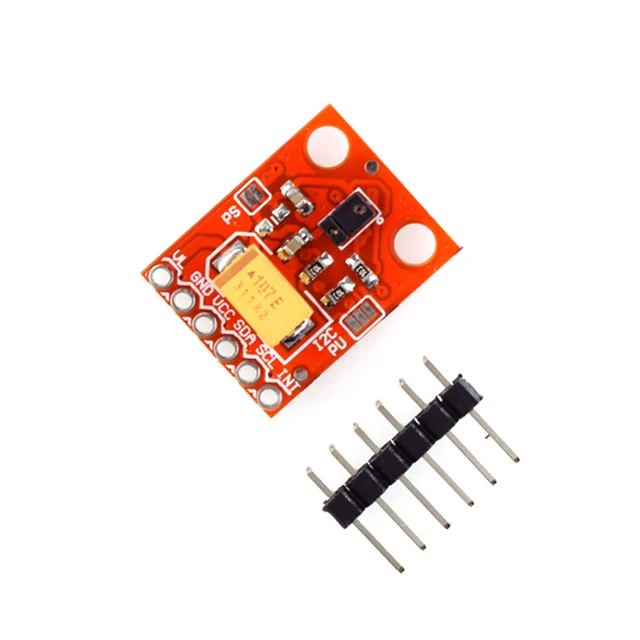
Detect up, down, left and right hand gestures using a GY-9960 / APDS9960 module and an ESP32. Establish I2C and gesture recognition before combining the sensor with a display or application menu.
Identify the APDS9960 breakout
The linked product exposes ambient/color, proximity and gesture sensing functions. This first exercise uses proximity-assisted gesture recognition only. Confirm that the board really carries APDS9960; a module with a similar optical package or I2C address can still need another driver.
Prepare the ESP32 and optical environment
The controller for this example is an ESP32-C3 Supermini. Confirm that its USB upload and serial test works before adding the module. Use ESP32C3 Dev Module with USB CDC On Boot enabled for native USB, and open Serial Monitor at 115200 baud. Disconnect power while changing wires.
Use 3.3 V for the sensor logic. Start with the optical opening uncovered, clear of enclosure edges and away from strong direct sunlight. Keep the board fixed in a known orientation so the gesture directions have a consistent frame of reference.
Connect I2C and check IR-LED power
| Module label | ESP32-C3 example | Purpose |
|---|---|---|
| VCC | 3V3 | 3.3 V logic supply for this setup |
| GND | GND | Common ground |
| SDA | GPIO6 | I2C data |
| SCL | GPIO7 | I2C clock |
GPIO6 and GPIO7 are explicit assignments for this C3 example. They are not physical header positions or universal ESP32 defaults. For another board, select free exposed pins using its own pinout and update Wire.begin(). Keep ESP32 I2C pull-ups at 3.3 V.
The APDS9960 address is normally 0x39. Leave INT unconnected for this polling example. Some breakouts expose a separate VL supply for the infrared LED. Check the board's fitted link/jumper and its VL requirements; an unpowered IR emitter can allow I2C initialization while preventing useful proximity or gesture operation. Do not apply 5 V to the sensor VCC or ESP32 I2C pins.
Install the gesture driver
In Arduino Library Manager install Adafruit APDS9960 Library and Adafruit BusIO. Accept the required dependencies. Paste the complete example into a new sketch, click Verify, then Upload. If reporting a problem, include the board profile, package version and library version.
The example enables proximity as well as gesture processing. It uses the driver's direction constants rather than assigning meaning to undocumented numeric results. Arduino_APDS9960 and other drivers have different APIs; avoid mixing their calls with this example.
Read hand gestures
Upload, open Serial Monitor and bring a hand near the sensor before making a clear pass across it. Move away between attempts so one gesture finishes before the next begins.
#include <Arduino.h>
#include <Wire.h>
#include <Adafruit_APDS9960.h>

Adafruit_APDS9960 gestures;
void setup() {
  Serial.begin(115200);
  delay(1500);
  Wire.begin(6, 7);
  if (!gestures.begin(10, APDS9960_AGAIN_4X, 0x39, &Wire)) {
    Serial.println("APDS9960 not found; check 3.3 V, address and device type.");
    while (true) delay(1000);
  }
  gestures.enableProximity(true);
  gestures.enableGesture(true);
}
void loop() {
  const uint8_t direction = gestures.readGesture();
  switch (direction) {
    case APDS9960_UP:    Serial.println("UP"); break;
    case APDS9960_DOWN:  Serial.println("DOWN"); break;
    case APDS9960_LEFT:  Serial.println("LEFT"); break;
    case APDS9960_RIGHT: Serial.println("RIGHT"); break;
    default: break;
  }
  delay(10);
}
Map recognition to your application
- Test one gesture direction repeatedly with the board held fixed.
- Try the opposite direction and check that the label changes.
- Rotate the board and note how its physical axes affect the labels.
- Map those axes into your application only after the raw recognition is repeatable.
Gesture labels are relative to the sensor orientation. They are not a compass direction or an absolute position measurement. For a menu-control project, add a deliberate action interval or confirmation so one hand movement does not trigger several application commands. Color and proximity readings can be explored separately after this test.
Troubleshooting
| Symptom | What to check |
|---|---|
| Initialization fails | Check 0x39, 3.3 V power, I2C wiring and actual sensor identity. |
| I2C works but gestures do not | Check IR-LED VL power, enabled proximity mode, optical obstruction and gesture distance. |
| Left/right appear reversed | Check physical mounting orientation and the application axis mapping. |
| Works in one room only | Repeat away from direct sunlight and strong infrared interference. |
| Library methods are missing | Install the exact Adafruit APDS9960 driver and keep one API workflow. |
References and next steps
Related product
Share the product link, hardware revision, software version and any error messages.
Contact ESP32S support →