Grove Water Level Sensor with ESP32: I2C Tutorial
Read both I2C sensing groups, report water-level sections and handle missing data while respecting the white immersion boundary.
On this page
Observe the immersion boundaryPrepare ArduinoConnect the I2C sensorRead both groups with a timeoutCheck the result at known levelsTroubleshootingSoftware versions and validationDownloads and referencesRelated products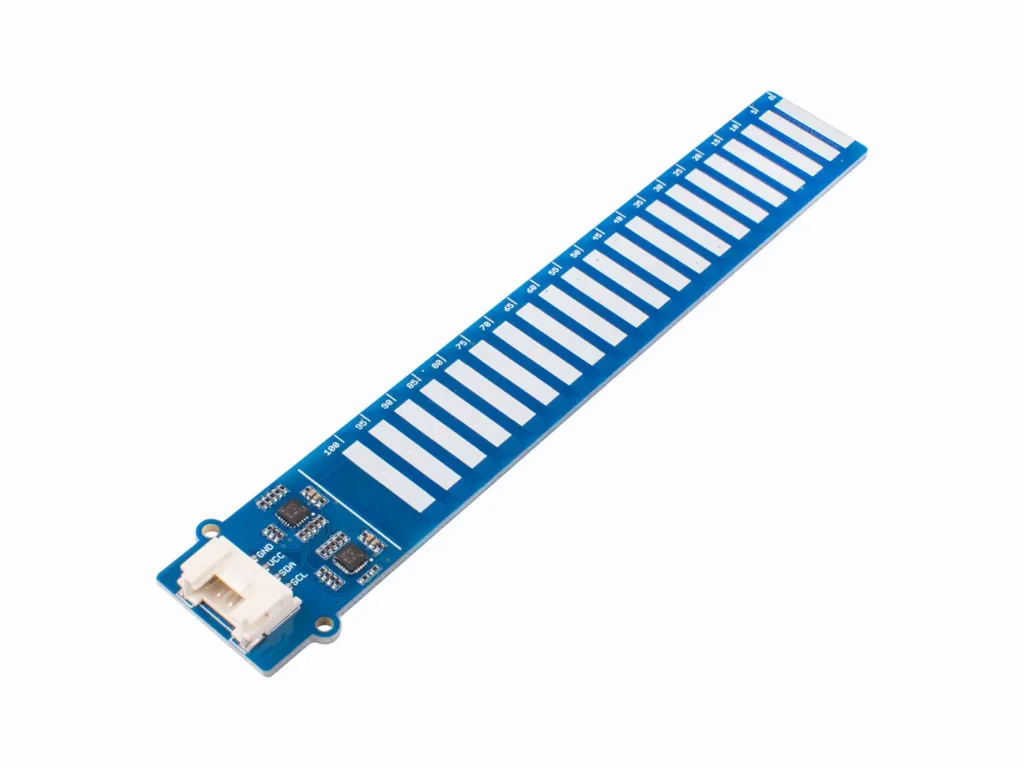
Read the Grove 10 cm capacitive water-level sensor from an ESP32 using I2C. This exercise reads both sensing sections, handles missing data and reports an estimated percentage of the active sensing length.
Observe the immersion boundary
Keep the protective coating intact and the liquid below the white dividing line. The coating on the sensing area does not make the entire connector and controller end suitable for submersion. Inspect for coating damage before placing the sensor in conductive liquid.
Prepare Arduino
Install esp32 by Espressif Systems in Arduino Boards Manager. The C3 examples use ESP32C3 Dev Module with USB CDC On Boot enabled and Serial Monitor at 115200 baud. Start with a working Arduino upload setup, then disconnect power before changing wires.
This example uses the built-in Wire library only. Start with the board outside the liquid and establish reliable I2C reads before testing water levels.
Connect the I2C sensor
| Grove signal | ESP32-C3 example | Purpose |
|---|---|---|
| VCC | 3V3 | 3.3 V module supply for this example |
| GND | GND | Common reference |
| SDA | GPIO6 | I2C data |
| SCL | GPIO7 | I2C clock |
These are GPIO numbers on the ESP32-C3 Supermini, not physical header numbers. Identify the Grove contacts from the module labels; cable color is only an aid. For another ESP32 board select free pins using its pinout and change the code. Keep I2C pull-ups at 3.3 V.
The manufacturer example reads eight lower sections from 0x77 and twelve upper sections from 0x78. Some general-purpose I2C scanners stop at 0x77, so a scanner result alone can miss the upper controller. The sketch below requests both addresses directly.
Read both groups with a timeout
A short read is reported as an error rather than an indefinite wait. The threshold follows the manufacturer demonstration and is a starting point for this sensor; validate it with your liquid and installation.
#include <Wire.h>
bool readSections(uint8_t address, uint8_t *buffer, uint8_t length) {
  size_t received = Wire.requestFrom(address, length);
  if (received != length) {
    while (Wire.available()) Wire.read();
    return false;
  }
  for (uint8_t i = 0; i < length; ++i) buffer[i] = Wire.read();
  return true;
}
void setup() {
  Serial.begin(115200); delay(1500);
  Wire.begin(6, 7); Wire.setClock(100000); Wire.setTimeOut(100);
}
void loop() {
  uint8_t low[8], high[12];
  if (!readSections(0x77, low, 8) || !readSections(0x78, high, 12)) {
    Serial.println("Incomplete I2C data; check both addresses and wiring.");
    delay(1000); return;
  }
  uint32_t wetMask = 0;
  for (uint8_t i = 0; i < 8; ++i) if (low[i] > 100) wetMask |= 1UL << i;
  for (uint8_t i = 0; i < 12; ++i) if (high[i] > 100) wetMask |= 1UL << (8 + i);
  uint8_t wetSections = 0;
  while (wetSections < 20 && (wetMask & (1UL << wetSections))) ++wetSections;
  Serial.printf("Consecutive wet sections: %u/20; level estimate: %u%%\n",
                wetSections, wetSections * 5);
  delay(1000);
}
Check the result at known levels
- Hold the sensor upright with the active area dry and note the reported state.
- Raise the liquid gradually without crossing the white line.
- Compare the reported number of consecutive wet sections with the actual immersed area.
- Lower the level and check that the indication falls again.
- Keep the installation and liquid type consistent when setting an application threshold.
Twenty sections yield 5% steps in this example. The output is a level estimate rather than an independently calibrated continuous ruler. A gap in the wet-section pattern stops the consecutive count, which is useful for spotting an inconsistent coating or mounting condition.
Troubleshooting
| Symptom | Check next |
|---|---|
| Only 0x77 appears in a scanner | Use the direct two-address read; inspect the scanner upper-address limit. |
| Incomplete I2C data | Check power, common ground and both bus lines; do not remove the timeout to hide a missing controller. |
| Always full or always empty | Test dry and partly immersed states, inspect coating and confirm liquid conditions. |
| Readings change after surface damage | Stop using damaged sensing coating and inspect the module. |
| Liquid reaches the connector end | Reduce the immersion depth and keep the white boundary above the liquid. |
Software versions and validation
Documentation reviewed on October 21, 2026. The included minimal sketch was compile-checked with Arduino-ESP32 3.3.0; library versions are listed below. Compilation does not replace a test on your physical module.
Only Arduino-ESP32 built-in APIs are required for the supplied example.
Downloads and references
- Seeed Grove Water Level Sensor hardware and protocol
- ESP32 Wire API
- Espressif Arduino-ESP32 documentation
Download the minimal Arduino sketch (.zip)
Related products
Share the product link, hardware revision, software version and any error messages.
Contact ESP32S support →