HC-SR501 with ESP32: PIR Motion, Timing & Wiring
Check the PIR supply and output levels, allow startup settling and understand retrigger settings with a digital-output test.
On this page
Understand motion versus presenceCheck supply and output levelsWire the digital outputSet the jumper and allow settlingMonitor output state changesTest repeatability before automationTroubleshootingReferences and next stepsRelated product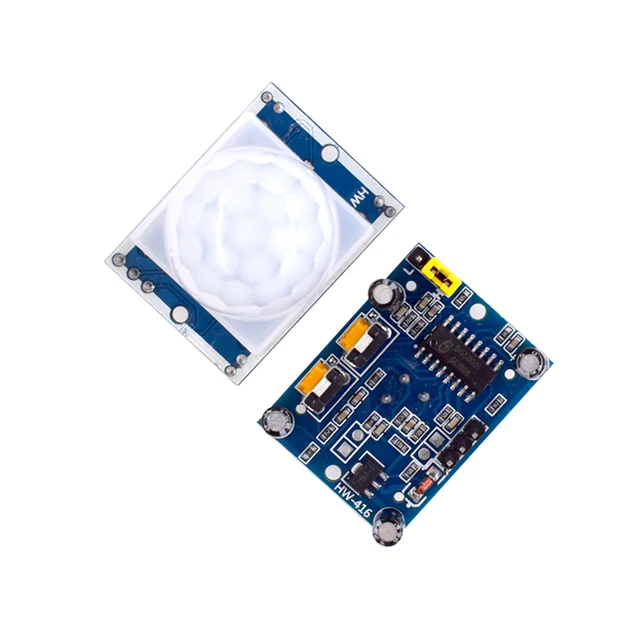
Detect motion with an HC-SR501 PIR module and an ESP32. This guide starts with the module's digital output, its startup settling period and the retrigger jumper, before adding lighting or automation logic.
Understand motion versus presence
A PIR module responds to changes in infrared energy across its sensing zones. It is useful for detecting movement, but a stationary person can stop producing motion events. The output also includes the module's timer behavior; it is not a continuous measurement of distance or a guarantee that a room is empty.
Check supply and output levels
The linked HC-SR501 listing specifies a supply above 3.3 V and an approximately 3.3 V high output. Use a regulated 5 V supply suitable for this module and verify the actual variant's output level before connecting it to an ESP32. Do not power this particular module from 3V3 merely because many small I2C sensors use that rail.
Keep the first test to the PIR module and a known-good ESP32-C3 Supermini. Identify VCC, OUT and GND from the board markings rather than assuming a connector order from another photo.
Wire the digital output
| HC-SR501 label | Example connection | Purpose |
|---|---|---|
| VCC | Regulated 5 V source | Module power, not an ESP32 input |
| GND | Supply return and ESP32 GND | Common ground |
| OUT | ESP32-C3 GPIO4 | Digital motion/timer output, verified 3.3 V compatible |
If using a development board's USB-derived 5 V rail, confirm it is actually exposed and available in that board's power configuration. Never connect that rail to the ESP32 3V3 pin. OUT is a digital signal; it does not connect to I2C SDA.
Set the jumper and allow settling
- Choose a short delay setting for a convenient initial test. Change trim controls gently and follow the actual board's marked direction.
- Note whether the H/L jumper selects retriggerable or non-retriggerable operation on your module.
- Power on and keep the scene relatively still for roughly a minute. Some modules need longer to settle.
- Test movement across the field of view rather than judging the module from startup pulses.
In retriggerable mode, ongoing movement can extend the high-output period. The software below waits about a minute before reporting state changes; it does not reconfigure the hardware timer.
Monitor output state changes
No additional sensor library is needed. Upload with native USB CDC enabled on the C3 board and open Serial Monitor at 115200 baud. The sketch prints a line only when OUT changes, so repeated empty lines are not required for normal operation.
#include <Arduino.h>

constexpr int PIR_PIN = 4;
constexpr unsigned long SETTLE_MS = 60000;
int previousState = -1;
void setup() {
  Serial.begin(115200);
  delay(1500);
  pinMode(PIR_PIN, INPUT);
  Serial.println("Allow about one minute for PIR settling.");
}
void loop() {
  if (millis() < SETTLE_MS) { delay(100); return; }
  const int state = digitalRead(PIR_PIN);
  if (state != previousState) {
    Serial.println(state == HIGH ? "Motion output HIGH" : "Motion output LOW");
    previousState = state;
  }
  delay(50);
}
Test repeatability before automation
Move through the sensing zones, stop, and observe how long the output remains high. Repeat with each intended jumper setting. Place the sensor where direct sunlight, heaters, airflow changes or moving warm objects do not dominate the test. The lens pattern, sensitivity control and mounting angle affect which motion is detected.
For a project that needs to detect relatively still occupants, review the separate presence-radar guides in the Wiki. First establish what the PIR output actually means before using it as an occupancy state in software.
Troubleshooting
| Symptom | What to check |
|---|---|
| Output pulses just after power-on | Allow startup settling before judging detection. |
| Output stays high while people move | Check retrigger mode and delay setting; a high interval can be extended. |
| Nothing detected at 3.3 V supply | Use the module's specified supply; its output logic level is a separate specification. |
| No new serial lines while the state is unchanged | Expected: this sketch reports transitions only. |
| Motion is detected but a still person is missed | Expected limitation of PIR motion sensing; choose a suitable sensing approach for the application. |
References and next steps
Related product
Share the product link, hardware revision, software version and any error messages.
Contact ESP32S support →