MPU6050 / GY-521 with ESP32: Motion & Gyro Readings
Wire the GY-521, select its I2C address and read acceleration and angular velocity with a complete Arduino example.
On this page
Know what the MPU6050 measuresPrepare the controllerWire the GY-521Install the motion driverRead acceleration and gyro dataCheck the axes with a slow movementTroubleshootingReferences and further readingRelated product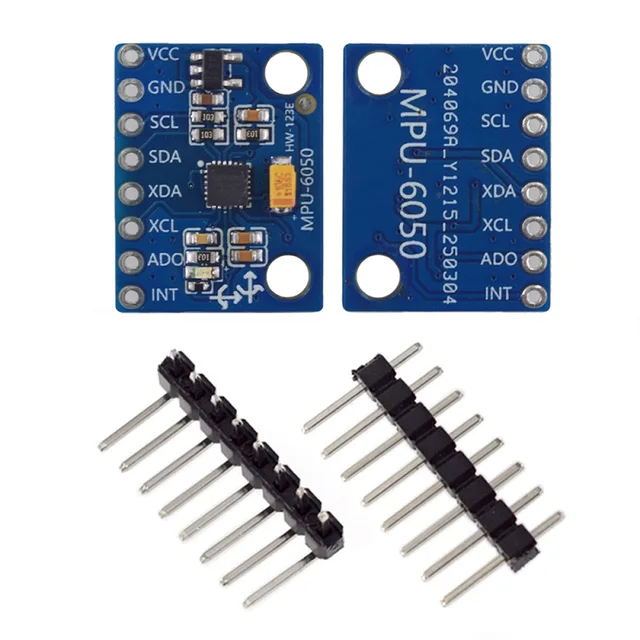
Use the GY-521 / MPU6050 breakout to read acceleration and angular velocity with an ESP32. Start with raw motion readings before adding tilt estimation, filtering or a larger robot application.
Know what the MPU6050 measures
The device combines a three-axis accelerometer and three-axis gyroscope. It is not a magnetometer, so this first example does not provide compass heading. Acceleration includes gravity, and integrating gyro measurements accumulates drift. A motion tutorial for another chip, such as an MPU9250, may use a different driver.
Prepare the controller
The example controller is an ESP32-C3 Supermini with free, exposed GPIO6 and GPIO7. First confirm that its serial/upload test works. Select ESP32C3 Dev Module and enable USB CDC On Boot for native USB. Open Serial Monitor at 115200 baud. Disconnect power before changing wires.
Inspect the module labels, header soldering and orientation. For this 3.3 V setup confirm that the particular breakout supports a 3.3 V supply and that its bus pull-ups do not go to a higher voltage.
Wire the GY-521
| Module label | ESP32-C3 Supermini | Connection |
|---|---|---|
| VCC / VDD | 3V3 | 3.3 V for this example |
| GND | GND | Common ground |
| SDA | GPIO6 | I2C data |
| SCL | GPIO7 | I2C clock |
These are explicitly assigned GPIO numbers for this C3 example, not physical header positions or universal ESP32 defaults. For another controller, choose free pins from its own pinout and change Wire.begin() in the sketch. Keep the first test on short wires with one peripheral.
Leave INT, XDA and XCL unconnected for this polling example. AD0 selects the I2C address: the usual low/default configuration is 0x68; a high configuration uses 0x69. Confirm the module's actual pull-up/down arrangement rather than leaving a bare chip input floating.
Install the motion driver
In Arduino Library Manager install Adafruit MPU6050, Adafruit BusIO and Adafruit Unified Sensor. Accept the listed dependencies. Create a new sketch, paste the complete example, click Verify, then Upload. Keep a record of your board profile and library versions when reporting an issue.
The sketch uses the 0x68 address. If an I2C scan finds 0x69, update the begin() argument. The SHT4x guide includes a scanner using the same example SDA/SCL assignments.
Read acceleration and gyro data
Upload with the board resting on a stable surface. The example selects a ±2 g acceleration range, ±250 degrees/second gyro range and a 21 Hz filter. Printed acceleration uses m/s²; printed gyro values use rad/s, even though the range selector is named in degrees/second.
#include <Arduino.h>
#include <Wire.h>
#include <Adafruit_MPU6050.h>
#include <Adafruit_Sensor.h>

Adafruit_MPU6050 motion;
void setup() {
  Serial.begin(115200);
  delay(1500);
  Wire.begin(6, 7); // SDA, SCL: ESP32-C3 Supermini example.
  if (!motion.begin(0x68, &Wire)) {
    Serial.println("MPU6050 not found; check address and wiring.");
    while (true) delay(1000);
  }
  motion.setAccelerometerRange(MPU6050_RANGE_2_G);
  motion.setGyroRange(MPU6050_RANGE_250_DEG);
  motion.setFilterBandwidth(MPU6050_BAND_21_HZ);
}
void loop() {
  sensors_event_t a, g, t;
  if (motion.getEvent(&a, &g, &t)) {
    Serial.printf("Accel m/s2: %.3f, %.3f, %.3f | Gyro rad/s: %.3f, %.3f, %.3f\n",
      a.acceleration.x, a.acceleration.y, a.acceleration.z,
      g.gyro.x, g.gyro.y, g.gyro.z);
  } else Serial.println("Motion read failed.");
  delay(250);
}
Check the axes with a slow movement
- Keep the sensor still and note all six numbers. One acceleration component, or a combination, should account for gravity.
- Rotate the board slowly through a quarter turn. The gravity components should move between axes.
- Turn it clockwise and then back: the gyro sign should reverse on the affected axis.
- Record the physical mounting orientation before writing your own axis transform.
A stationary board will not show all accelerometer axes near zero. Small gyro offsets are also normal and should be measured in the final mounting position before an integration experiment. Avoid treating the chip's internal temperature as a calibrated room-air measurement.
Troubleshooting
| Symptom | Check next |
|---|---|
| Sensor not found | Check power, SDA/SCL, AD0/address, solder joints and the selected driver. |
| Large readings at rest | First distinguish gravity from motion; then check mechanical vibration and selected range. |
| Angles slowly wander | Raw gyro integration needs bias correction and sensor fusion; this sketch prints rates, not absolute angles. |
| Values do not respond | Confirm a genuine responding MPU6050-compatible device, correct addresses and fresh serial lines. |
| Works only with long delays | Keep wires short and check bus pull-ups before increasing I2C speed. |
References and further reading
Related product
Share the product link, hardware revision, software version and any error messages.
Contact ESP32S support →