LOLIN D1 mini V4: ESP8266 Arduino & Wi-Fi Setup
Set up the ESP8266 package, understand D-label pin mapping and test USB serial and Wi-Fi on the D1 mini V4.
On this page
Identify the board and prepare USBInstall the ESP8266 packageUnderstand D labels before wiringUpload a serial and Wi-Fi testInterpret the resultConnect your first peripheralTroubleshootingReferences and further readingRelated productOther D1 mini listings and USB variants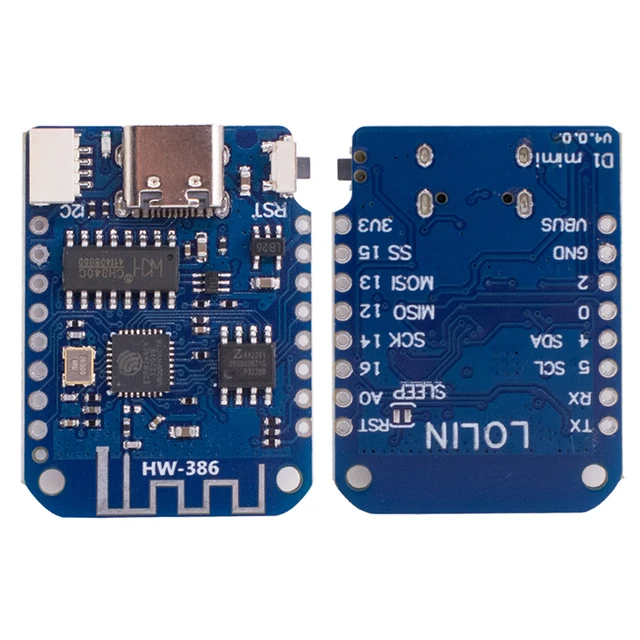
Bring up the LOLIN / WEMOS D1 mini V4.0.0 using Arduino IDE, then confirm serial communication and 2.4 GHz Wi-Fi. This is an ESP8266 board; it uses a different Arduino package from ESP32-C3, C6 and S3 boards.
Identify the board and prepare USB
Check the V4.0.0 marking and USB-C connector against the product photo. The listed board has 4 MB Flash and a USB-to-serial bridge. Use a USB data cable and connect the board alone for the first upload. Compare the computer port list before and after connecting it. A power light does not establish that the cable carries data.
Install the ESP8266 package
- Open Arduino IDE Preferences and add the official package URL below to Additional Boards Manager URLs. Keep other package URLs already in use.
- In Boards Manager install esp8266 by ESP8266 Community.
- Select the matching LOLIN(WEMOS) D1 R2 & mini target and the board's serial port.
- Start with the profile defaults and 115200 upload speed; retain the 4 MB Flash setting appropriate to the listed board.
https://arduino.esp8266.com/stable/package_esp8266com_index.jsonThis board does not use the ESP32 USB CDC On Boot option. If the port is absent, identify the actual bridge chip and use its manufacturer driver. Connector shape is not a driver identifier.
Understand D labels before wiring
| PCB label | ESP8266 GPIO | Useful starting point |
|---|---|---|
| D1 | GPIO5 | I2C SCL |
| D2 | GPIO4 | I2C SDA |
| D4 | GPIO2 | Built-in LED signal on the standard profile |
| D3 / D8 | GPIO0 / GPIO15 | Boot-strapping signals: avoid external loads for initial tests |
All digital I/O uses 3.3 V logic. USB input power is a separate matter from GPIO voltage. The V4 board documentation specifies a 3.2 V maximum at A0; do not apply a 5 V signal. Keep USB and external wiring disconnected while checking uncertain pin labels.
Upload a serial and Wi-Fi test
Paste this sketch and upload it. Reopen Serial Monitor at 115200 baud, then press Reset. It prints the detected Flash capacity and repeatedly scans nearby networks without requiring a password. The ESP8266 sees 2.4 GHz networks, not a 5 GHz-only access point.
#include <Arduino.h>
#include <ESP8266WiFi.h>

void setup() {
  Serial.begin(115200);
  delay(1000);
  Serial.printf("Flash detected: %lu bytes\n", (unsigned long)ESP.getFlashChipRealSize());
  WiFi.persistent(false);
  WiFi.mode(WIFI_STA);
  WiFi.disconnect();
  delay(200);
}
void loop() {
  const int count = WiFi.scanNetworks();
  Serial.printf("Networks found: %d\n", count);
  for (int i = 0; i < count; ++i) {
    Serial.printf("%s : %d dBm\n", WiFi.SSID(i).c_str(), WiFi.RSSI(i));
  }
  WiFi.scanDelete();
  delay(10000);
}
Interpret the result
A detected capacity near 4,194,304 bytes is consistent with the listed Flash configuration. Network names and RSSI values confirm that the application is running and the radio can receive nearby access points. A more negative RSSI value means a weaker received signal. Zero networks is a reason to repeat close to a known 2.4 GHz source; it is not by itself proof of hardware failure.
Connect your first peripheral
Use D2/GPIO4 for SDA and D1/GPIO5 for SCL when adapting an I2C tutorial. For example, the SSD1306 OLED guide can be adapted by changing Wire.begin() to Wire.begin(D2, D1). Do not reuse an ESP32-C3 GPIO6/7 wiring assignment on an ESP8266: those signals have different board functions.
Troubleshooting
| Symptom | Check next |
|---|---|
| Port missing | Try another data cable and USB socket; identify the bridge before installing a driver. |
| ESP32 header/library errors | Select the ESP8266 D1 mini target and ESP8266WiFi.h. |
| Upload will not connect | Remove shields and boot-pin wiring, close serial applications and retry Reset. Check the exact revision's manual download procedure. |
| Unreadable text just after reset | ESP8266 boot messages can use a different baud rate from the 115200 application output; wait for the sketch's repeated scan. |
| Resets with a peripheral attached | Recheck supply, common ground, polarity and boot-strapping pins. |
References and further reading
- LOLIN D1 mini V4 documentation
- ESP8266 Arduino installation
- D1 mini Arduino pin definitions
- ESP8266 Wi-Fi scan API
Related product
Other D1 mini listings and USB variants
The linked LOLIN V4 and Type-C/Micro USB D1 mini listings all use the ESP8266 Arduino toolchain. The ESP32 core does not replace it. A Type-C plug alone does not prove V4 hardware or the LOLIN I2C port. For a generic board, use the common USB/upload steps first and check its actual pinout, USB chip, regulator and A0 divider separately. Do not apply 5 V to GPIO or assume a 24 V VIN input.
Related module variants in our store:
Share the product link, hardware revision, software version and any error messages.
Contact ESP32S support →