DS3231 with ESP32: Set Time, Read Clock & Backup
Set the DS3231 once, read its calendar over I2C and check backup-battery compatibility without resetting the time on every boot.
On this page
Identify the clock and battery holderPrepare the controllerConnect the I2C clock moduleInstall RTClib and set time onceRead the running calendarTest backup operation deliberatelyTroubleshootingReferences and next stepsRelated productDS3231 module variants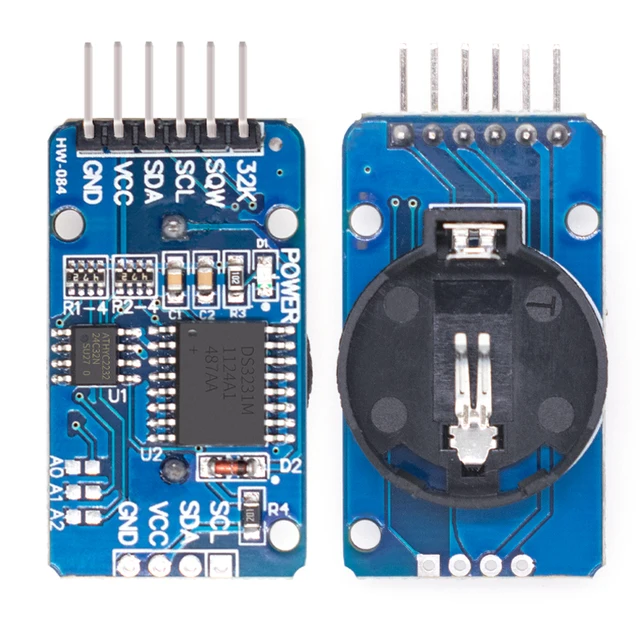
Set and read the DS3231 real-time clock from an ESP32, then understand what the backup battery does. The linked module also includes an AT24C32 EEPROM, which is a separate device and is not used by this first clock example.
Identify the clock and battery holder
Check the DS3231 marking and the actual module revision. The product is supplied without a battery. Leave the holder empty for initial USB-powered testing. Some generic modules include a charging circuit and others do not; the holder shape alone does not determine whether a rechargeable or non-rechargeable cell is appropriate.
Prepare the controller
The controller for this example is an ESP32-C3 Supermini. Confirm that its USB upload and serial test works before adding the module. Use ESP32C3 Dev Module with USB CDC On Boot enabled for native USB, and open Serial Monitor at 115200 baud. Disconnect power while changing wires.
Use a stable 3.3 V module supply and common ground. The clock stores calendar values, but it does not automatically know your local time zone or obtain Internet time. Decide whether your application stores UTC or local civil time before setting it.
Connect the I2C clock module
| Module label | ESP32-C3 example | Purpose |
|---|---|---|
| VCC / VIN | 3V3 | 3.3 V logic supply for this setup |
| GND | GND | Common ground |
| SDA | GPIO6 | I2C data |
| SCL | GPIO7 | I2C clock |
GPIO6 and GPIO7 are explicit assignments for this C3 example. They are not physical header positions or universal ESP32 defaults. For another board, select free exposed pins using its own pinout and update Wire.begin(). Keep ESP32 I2C pull-ups at 3.3 V.
The DS3231 responds at 0x68. An additional address, often 0x57 on this module, can belong to the AT24C32 EEPROM. Leave SQW and 32K unconnected for this polling test. If another device already uses 0x68, isolate it or use the TCA9548A guide rather than putting both on the same active bus segment.
Install RTClib and set time once
In Arduino Library Manager install RTClib by Adafruit and Adafruit BusIO. Accept the required dependencies. Paste the complete example into a new sketch, click Verify, then Upload. If reporting a problem, include the board profile, package version and library version.
- Check the computer clock used to compile the sketch.
- For the initial setting upload, change SET_TIME_ONCE to true. The compiled date/time will be written during setup.
- Confirm that the displayed calendar advances.
- Change SET_TIME_ONCE back to false and upload again, so ordinary resets do not overwrite a running clock.
Compilation and uploading add a small delay, so the build timestamp is a convenient first setup value rather than a precision synchronization method. The clock values contain no time-zone metadata.
Read the running calendar
The supplied default is SET_TIME_ONCE=false to avoid overwriting an existing clock. A fresh module that reports lost power will ask you to perform the one-time setting step instead of silently presenting uninitialized values.
#include <Arduino.h>
#include <Wire.h>
#include <RTClib.h>

RTC_DS3231 rtc;
constexpr bool SET_TIME_ONCE = false; // Set true for one upload, then false and upload again.
void setup() {
  Serial.begin(115200);
  delay(1500);
  Wire.begin(6, 7);
  if (!rtc.begin(&Wire)) {
    Serial.println("DS3231 not found at 0x68.");
    while (true) delay(1000);
  }
  if (SET_TIME_ONCE) rtc.adjust(DateTime(F(__DATE__), F(__TIME__)));
  if (rtc.lostPower()) {
    Serial.println("Clock needs setting. Follow the SET_TIME_ONCE step.");
    while (true) delay(1000);
  }
}
void loop() {
  const DateTime now = rtc.now();
  Serial.printf("%04u-%02u-%02u %02u:%02u:%02u\n",
    (unsigned)now.year(), (unsigned)now.month(), (unsigned)now.day(),
    (unsigned)now.hour(), (unsigned)now.minute(), (unsigned)now.second());
  delay(1000);
}
Test backup operation deliberately
First verify timekeeping while main power remains connected. For a later unplug-and-reconnect test, identify the module's charging arrangement and use a compatible backup source with correct polarity. A non-rechargeable coin cell must not be connected to an active charging circuit.
The backup source maintains the RTC when the ESP32 is off; it does not power the whole ESP32 development board. Reconnect main power and read the clock with SET_TIME_ONCE=false. Account for your chosen UTC/local-time convention separately in application software.
Troubleshooting
| Symptom | What to check |
|---|---|
| Clock not found | Check 0x68, power, SDA/SCL and address conflicts. |
| Time jumps back on each reset | Disable SET_TIME_ONCE after the setting upload. |
| Time is lost after unplugging | Check the correct backup source, holder contacts and module charging design. |
| Clock is off by whole hours | Check the UTC/local-time convention; the RTC does not apply a time zone for you. |
| I2C scanner shows a second address | The module's EEPROM can be present independently of the RTC. |
References and next steps
Related product
DS3231 AT24C32 IIC Module Precision Clock Module (without battery) DS3231 Memory Module →
DS3231 module variants
The related listing includes different module forms and DS3231SN/M references. This guide’s initial I2C/calendar workflow is the common starting point, but do not transfer an SN precision figure, EEPROM presence, battery type or charging behavior to every variant. Verify the actual markings and keep the holder empty for the first powered test. A battery connector alone does not prove a rechargeable-cell circuit is fitted.
Related module variants in our store:
Share the product link, hardware revision, software version and any error messages.
Contact ESP32S support →