XIAO RS485 with ESP32: Wiring & Serial Test
Connect two XIAO ESP32-C3 RS485 nodes, use explicit RX/TX and direction pins, and verify transport before adding Modbus.
On this page
Identify the breakout and the controllerSet up two independently powered nodesUse the executable example pin mappingPrepare ArduinoUpload transmitter and receiver buildsVerify both directions separatelyAdd an industrial device after the link testTroubleshootingSoftware versions and validationDownloads and referencesRelated products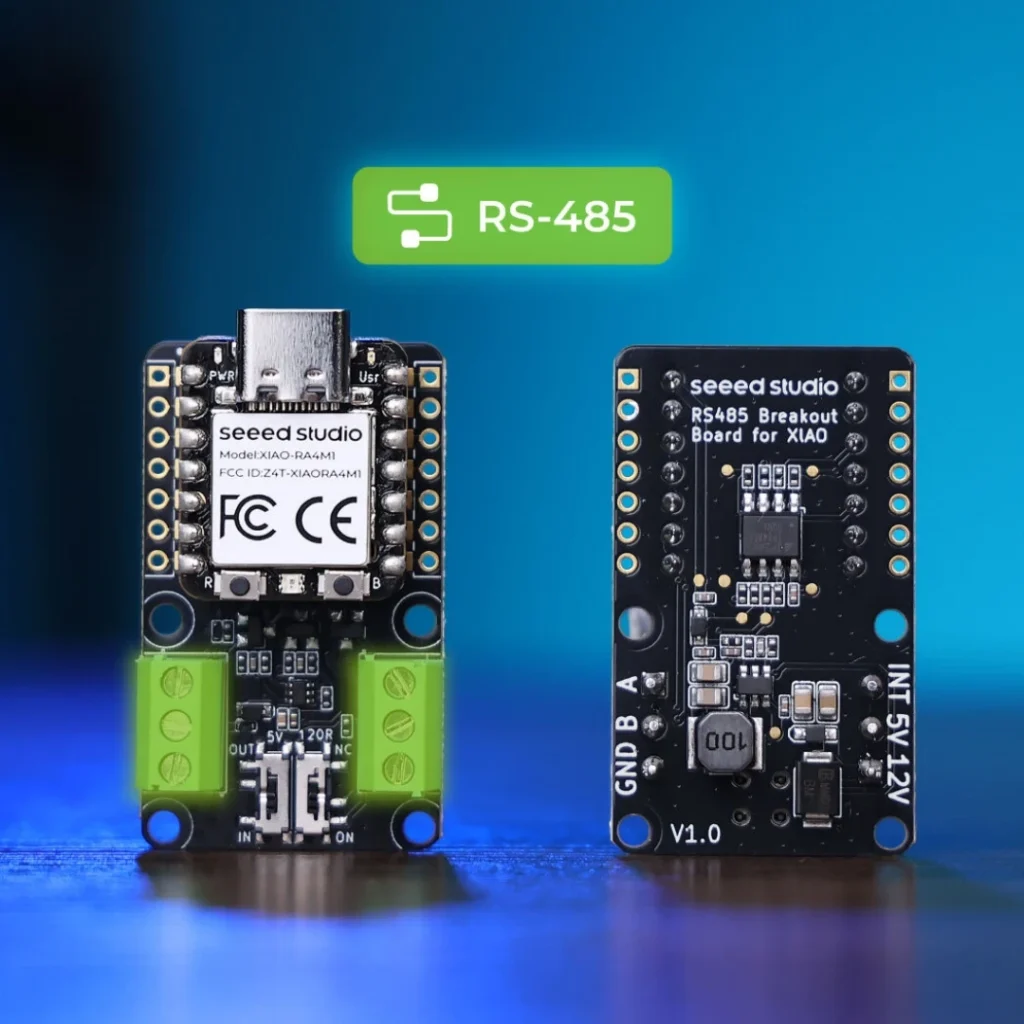
Test the Seeed XIAO RS485 breakout with two XIAO ESP32-C3 boards. Use a controlled transmitter/receiver test before connecting a third-party industrial sensor or adding a Modbus protocol.
Identify the breakout and the controller
This guide follows the Seeed TP8485E XIAO breakout and its official ESP32-C3 example. D labels are XIAO connector names, while GPIO numbers identify the ESP32 pins. They are not interchangeable across every XIAO processor.
Set up two independently powered nodes
- Fit the matching XIAO boards with power disconnected.
- For this first test power each XIAO through its own USB connection. Leave the external 5 V and 12 V power terminals disconnected.
- Keep the 5 V direction switch in IN so this test does not distribute power through that terminal. Do not join two powered 5 V outputs.
- Connect the signal terminal A to A, B to B and GND to GND. Use the labels on the board rather than assuming terminal order from another RS485 module.
- For a simple point-to-point bus, enable termination at the two ends; do not add end termination at every node of a later multi-drop bus.
Use the executable example pin mapping
| Signal on this XIAO ESP32-C3 setup | GPIO |
|---|---|
| UART receive: D5 | GPIO7 |
| UART transmit: D4 | GPIO6 |
| Direction enable: D2 | GPIO4 |
The manufacturer example calls begin(115200, SERIAL_8N1, 7, 6). Arduino takes RX before TX in that call. Some explanatory comments on the original page swap labels; the table above follows the executable GPIO arguments. Do not copy an RX/TX comment without checking the API order.
Prepare Arduino
Install the ESP32 core and select a matching XIAO ESP32-C3 profile, or a compatible ESP32C3 Dev Module configuration with USB CDC enabled. The included numeric-GPIO example was compile-checked on the C3 Dev Module target. Open Serial Monitor at 115200 baud. No third-party library is required.
Upload transmitter and receiver builds
Upload this sketch with TRANSMITTER=true to one board and TRANSMITTER=false to the other. The transmitter briefly enables its driver, sends a numbered line, waits for UART transmission to finish and returns to receive mode. The second board keeps its driver disabled and prints received characters.
#include <HardwareSerial.h>
HardwareSerial bus(1);
constexpr int RX_PIN = 7;      // XIAO ESP32-C3 D5
constexpr int TX_PIN = 6;      // XIAO ESP32-C3 D4
constexpr int ENABLE_PIN = 4;  // XIAO ESP32-C3 D2
constexpr bool TRANSMITTER = true; // Set false on the second board
void setup() {
  Serial.begin(115200); delay(1500);
  pinMode(ENABLE_PIN, OUTPUT); digitalWrite(ENABLE_PIN, LOW);
  bus.begin(115200, SERIAL_8N1, RX_PIN, TX_PIN);
  Serial.println(TRANSMITTER ? "RS485 transmitter" : "RS485 receiver");
}
void loop() {
  static uint32_t previous = 0, sequence = 0;
  if (TRANSMITTER && millis() - previous >= 2000) {
    previous = millis();
    digitalWrite(ENABLE_PIN, HIGH); delayMicroseconds(100);
    bus.printf("ESP32S RS485 test %lu\n", (unsigned long)++sequence);
    bus.flush(); // Finish the UART transmission before returning to receive
    delayMicroseconds(100); digitalWrite(ENABLE_PIN, LOW);
    Serial.printf("Sent %lu\n", (unsigned long)sequence);
  }
  while (bus.available()) Serial.write(bus.read());
  delay(1);
}
Verify both directions separately
Check that the receiver prints increasing sequence numbers. Then exchange the two software roles and repeat. This establishes basic direction control and transport in both directions without both drivers talking at once. It does not automatically establish a working Modbus device address or register map.
Add an industrial device after the link test
Record the device protocol, baud rate, parity, slave address and register map before replacing the second test node. RS485 defines the electrical bus; it does not define those application details. Supply an attached sensor according to its own voltage requirement, with a deliberate power and ground plan rather than reusing the test cable arrangement blindly.
Troubleshooting
| Symptom | Check next |
|---|---|
| No received text | Check A/B/GND, the receiver build, USB power and direction-enable GPIO. |
| Both nodes send but neither receives | Keep one node in receiver mode for this first experiment. |
| Garbled text | Match 115200/8N1 and check wiring/termination. |
| Works with the test node but not a sensor | Confirm the sensor protocol, address, parity, register map and power requirements. |
| Different XIAO processor is used | Translate D2/D4/D5 through that board’s pinout instead of reusing C3 GPIO4/6/7. |
Software versions and validation
Documentation reviewed on October 21, 2026. The included minimal sketch was compile-checked with Arduino-ESP32 3.3.0; library versions are listed below. Compilation does not replace a test on your physical module.
Only Arduino-ESP32 built-in APIs are required for the supplied example.
Downloads and references
- Seeed XIAO RS485 hardware and executable examples
- Espressif HardwareSerial API argument order
- Espressif Arduino-ESP32 documentation
Download the minimal Arduino sketch (.zip)
Related products
Share the product link, hardware revision, software version and any error messages.
Contact ESP32S support →