INMP441 with ESP32: I2S Microphone & Audio-Level Test
Wire the I2S microphone, match its left/right slot and capture an audio-level signal with the Arduino-ESP32 3.x I2S API.
On this page
Understand I2S versus I2CPrepare the software versionWire a left-channel microphoneUpload the audio-level testCheck that sound changes the resultMove from levels to recordingsTroubleshootingReferences and further readingRelated product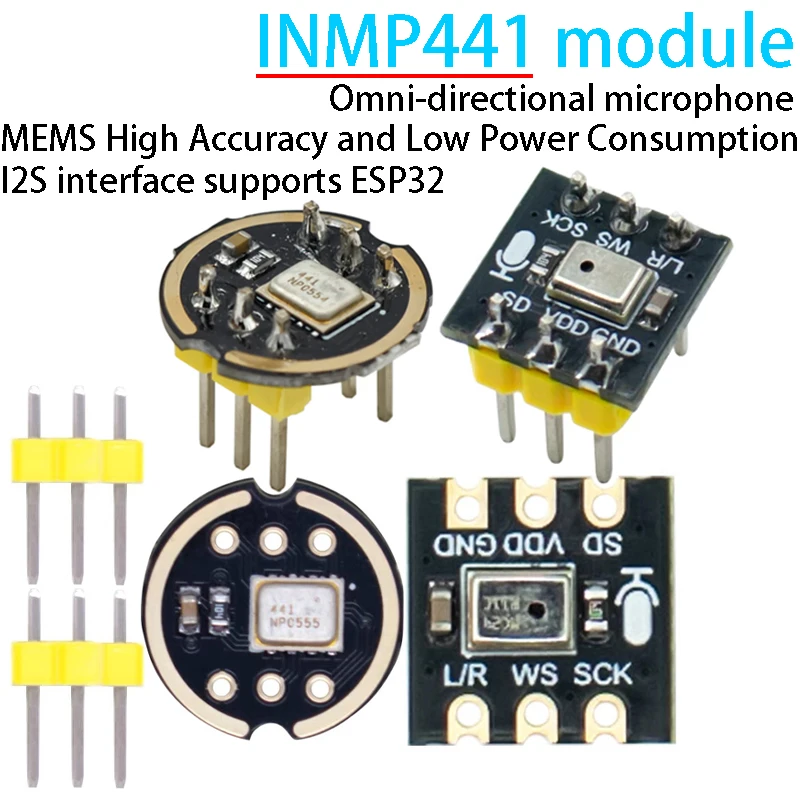
Capture a simple audio-level signal from the INMP441 I2S microphone using an ESP32-C3. This first test prints a relative level to Serial Monitor; it does not require a cloud account, speaker or voice assistant firmware.
Understand I2S versus I2C
INMP441 sends digital audio through an I2S bus. Its SCK, WS and SD signals are not an I2C SCL/SDA pair, and it will not appear in an I2C scanner. The ESP32 generates the clocks and receives samples from the microphone. L/R selects which audio slot contains the microphone data.
Prepare the software version
Use a working ESP32-C3 Supermini and Arduino-ESP32 3.3.0 or a compatible 3.x release. This tutorial uses ESP_I2S.h from the board package. Older examples based on driver/i2s.h use a different API; do not mix configuration fragments between the two workflows. Enable USB CDC On Boot for native USB serial output.
Wire a left-channel microphone
| INMP441 label | ESP32-C3 example | Purpose |
|---|---|---|
| VDD / VCC | 3V3 | 3.3 V supply; do not use 5 V |
| GND | GND | Common return |
| SCK / BCLK | GPIO4 | Bit clock from controller |
| WS / LRCLK | GPIO5 | Word/channel clock |
| SD | GPIO6 | Microphone output to ESP32 input |
| L/R | GND | Select the left audio slot |
These are free-pin assignments for the C3 example, not the GPIO14/15/32 wiring sometimes shown for classic ESP32 boards. Keep audio wires short and leave the microphone sound port unobstructed. No MCLK wire is used in this setup.
Upload the audio-level test
Use 115200 baud for Serial Monitor. The example reads 32-bit words at a 16 kHz sample rate and selects the left slot to match L/R tied low. It removes the sample mean before calculating a relative RMS value. The INMP441's 24-bit sample data is carried within the I2S word format.
#include <Arduino.h>
#include <ESP_I2S.h>
#include <math.h>

I2SClass microphone;
int32_t samples[256];
void setup() {
  Serial.begin(115200);
  delay(1500);
  // ESP32-C3 Supermini example: BCLK, WS, unused DOUT, microphone DIN.
  microphone.setPins(4, 5, -1, 6);
  if (!microphone.begin(I2S_MODE_STD, 16000, I2S_DATA_BIT_WIDTH_32BIT,
                        I2S_SLOT_MODE_MONO, I2S_STD_SLOT_LEFT)) {
    Serial.printf("I2S start failed: %d\n", microphone.lastError());
    while (true) delay(1000);
  }
}
void loop() {
  const size_t bytes = microphone.readBytes((char*)samples, sizeof(samples));
  const size_t count = bytes / sizeof(samples[0]);
  if (!count) { Serial.println("No audio data."); return; }
  double mean = 0, energy = 0;
  for (size_t i = 0; i < count; ++i) mean += (double)samples[i] / 2147483648.0;
  mean /= count;
  for (size_t i = 0; i < count; ++i) {
    const double value = (double)samples[i] / 2147483648.0 - mean;
    energy += value * value;
  }
  Serial.printf("Relative RMS: %.6f\n", sqrt(energy / count));
}
Check that sound changes the result
- Keep the board still and note the quiet-room baseline.
- Speak near the microphone without covering its port.
- Look for an increase in Relative RMS, then a decrease when the room becomes quiet.
- Repeat with the microphone physically separated from fans, motors or vibrating cables.
The printed number is a relative digital amplitude, not calibrated sound-pressure dB. A working level test confirms reception but does not validate frequency response, recording quality or speech recognition. Avoid blowing directly into the microphone when checking it.
Move from levels to recordings
Once the level changes reliably, save a short PCM recording using the same sample format or adapt a supported voice application. Preserve the sample rate, slot selection and sample-width handling throughout the pipeline. A speaker or amplifier is a separate output device and should be added only after microphone reception is understood.
Troubleshooting
| Symptom | Check next |
|---|---|
| All zeros or extremely low values | Check SD as an ESP32 input, generated clocks and L/R matched to the selected slot. |
| I2S begin fails | Confirm the board target, ESP32 package version and that pins/peripheral are not already in use. |
| No device in I2C scanner | Expected: this is an I2S audio device. |
| Very high level in quiet conditions | Check wiring, format, supply noise and mechanical vibration. |
| Legacy example will not compile | Use one API consistently; the complete example here targets the 3.x ESP_I2S library. |
References and further reading
Related product
Share the product link, hardware revision, software version and any error messages.
Contact ESP32S support →