SHT40 / SHT41 / SHT45 with ESP32: Wiring & Arduino
Wire an SHT4x sensor at 3.3 V, scan its I2C address and read temperature and humidity with the official Sensirion driver.
On this page
What this guide coversPrepare a simple 3.3 V setupWire the sensor to an ESP32-C3 SuperminiFind the I2C addressInstall the official driverRead temperature and humidityCheck the first readingsTroubleshootingReferences and next stepsRelated products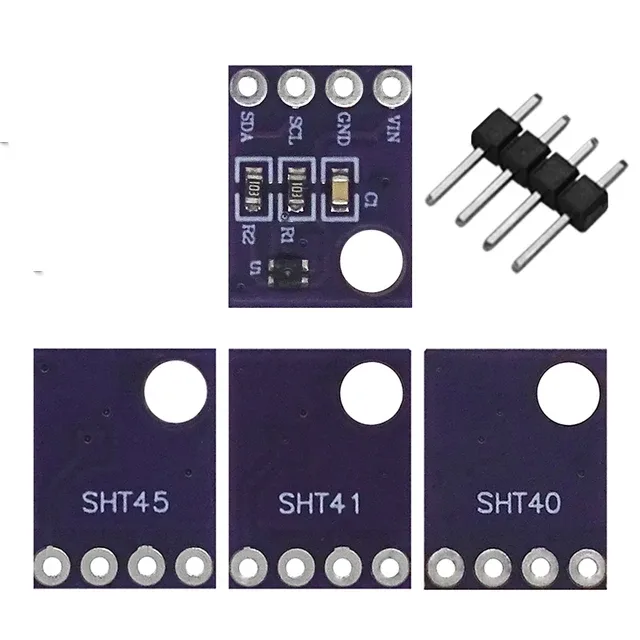
What this guide covers
Read temperature and relative humidity from an SHT40, SHT41 or SHT45 breakout using an ESP32 and I2C. The procedure also applies to the related Qwiic-style SHT40/SHT45 module linked below when its connector and supply ratings have been checked. The SHT4x module is a peripheral: it needs a microcontroller to read it.
Match your selected variant to the actual sensor marking. A successful I2C scan confirms that something acknowledges the address; it does not independently prove the sensor model or its accuracy grade.
Prepare a simple 3.3 V setup
Use a working ESP32 board, the sensor module, four jumper wires and a USB data cable. First verify the ESP32 using its own Supermini quickstart. Use 3.3 V power and 3.3 V I2C pull-ups for the example. Do not infer 5 V compatibility from connector shape or wire color.
Wire the sensor to an ESP32-C3 Supermini
This example assigns SDA to GPIO6 and SCL to GPIO7. Confirm those labeled GPIOs are exposed and unused on your board before connecting. Wire with power disconnected.
| Sensor module label | ESP32-C3 example | Purpose |
|---|---|---|
| VCC / 3V3 | 3V3 | 3.3 V supply, within the module's rating |
| GND | GND | Common ground |
| SDA | GPIO6 | I2C data |
| SCL | GPIO7 | I2C clock |
These are example assignments, not a universal ESP32 pinout. On a classic ESP32 DevKit you may instead use GPIO21/22 and change both constants in the sketches. For C6, S3 and other boards, select free exposed pins from that board's pinout.
SDA and SCL need pull-ups to the correct supply. Breakouts commonly include them. Check the module schematic before adding more; the related breakaway Qwiic board can lose its pull-ups when its sensor section is separated. Follow the printed connector labels rather than assuming every four-pin cable has the same order.
Find the I2C address
Upload this scanner and open Serial Monitor at 115200 baud. Start at 100 kHz with short wires and only one sensor attached.
#include <Arduino.h>
#include <Wire.h>

// Example: ESP32-C3 Supermini with free, exposed GPIO6 and GPIO7.
constexpr int SDA_PIN = 6;
constexpr int SCL_PIN = 7;

void setup() {
  Serial.begin(115200);
  delay(1500);
  Wire.begin(SDA_PIN, SCL_PIN);
  Wire.setClock(100000);
}

void loop() {
  int found = 0;
  for (uint8_t address = 1; address < 127; ++address) {
    Wire.beginTransmission(address);
    if (Wire.endTransmission() == 0) {
      Serial.printf("I2C response at 0x%02X\n", address);
      ++found;
    }
  }
  Serial.printf("Devices responding: %d\n", found);
  delay(3000);
}
SHT4x variants can use 0x44 or 0x45. Note the responding address and check it against your module's documentation. If nothing responds, fix the wiring or supply before installing another sensor library.
Install the official driver
In Arduino Library Manager install Sensirion I2C SHT4x and its Sensirion Core dependency. The current driver uses the header SensirionI2cSht4x.h. The minimal sketch below calls the manufacturer's driver API; it is not a DHT sensor example.
Read temperature and humidity
Keep the same wiring. Set SENSOR_ADDRESS to the result of your scan, then upload this sketch. Successful reads print degrees Celsius and percent relative humidity every two seconds. A nonzero result is an error and should not be treated as a valid measurement.
#include <Arduino.h>
#include <Wire.h>
#include <SensirionI2cSht4x.h>

constexpr int SDA_PIN = 6;
constexpr int SCL_PIN = 7;
constexpr uint8_t SENSOR_ADDRESS = 0x44; // Match the I2C scan result.
SensirionI2cSht4x climate;

void setup() {
  Serial.begin(115200);
  delay(1500);
  Wire.begin(SDA_PIN, SCL_PIN);
  Wire.setClock(100000);
  climate.begin(Wire, SENSOR_ADDRESS);
}

void loop() {
  float celsius = 0;
  float humidity = 0;
  const int16_t result = climate.measureHighPrecision(celsius, humidity);
  if (result == 0) {
    Serial.printf("Temperature: %.2f C | Humidity: %.2f %%RH\n",
                  celsius, humidity);
  } else {
    Serial.printf("Sensor read failed (code %d). Check address and wiring.\n",
                  (int)result);
  }
  delay(2000);
}
Check the first readings
- Leave the sensor in still room air and wait for it to settle after handling.
- Compare trends with a nearby reference sensor in the same location.
- Move the breakout away from the ESP32, regulator and other heat sources if readings are consistently warm.
- Record the exact SHT40/41/45 variant when comparing accuracy specifications.
Keep the sensing opening clear. Mount the module where air can reach it, and keep water, adhesive and coating off that opening. Heater commands are deliberately not used in this basic ambient-reading sketch.
Troubleshooting
| Symptom | Likely check |
|---|---|
| No address responds | Supply, common ground, reversed SDA/SCL, selected GPIOs and pull-ups. |
| Scanner works, measurement fails | Correct address, actual SHT4x device, driver version and intermittent connections. |
| Missing header or class name | Install the official library named above and its dependency; older third-party libraries have different APIs. |
| Works on one board only | Set SDA_PIN and SCL_PIN for the new board instead of relying on another board's defaults. |
| Humidity or temperature looks wrong | Let the device settle and check local heating, contamination and the exact sensor variant. |
References and next steps
- Sensirion SHT4x Arduino library
- Sensirion driver API
- Espressif I2C / Wire documentation
- Sensirion SHT40 product documentation
Need help? Send the product link, board photographs, package version, selected Tools options and complete error output to ESP32S support.
Related products
Share the product link, hardware revision, software version and any error messages.
Contact ESP32S support →