ADS1115 with ESP32: Analog Input, Gain & Voltage
Wire the 16-bit I2C ADC, distinguish gain range from input limits and read a known analog voltage using Arduino.
On this page
Identify ADS1115 and its input limitsPrepare a known analog sourceWire the ADC and A0Install the ADS driverRead counts and voltsValidate before connecting a sensorTroubleshootingReferences and next stepsRelated productGrove and alternative ADS1115 modules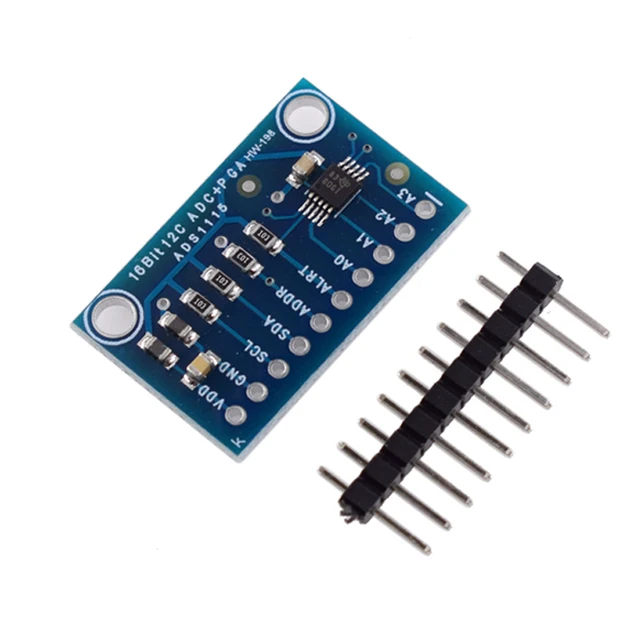
Add an external analog input to an ESP32 using the ADS1115 I2C ADC module. The first exercise reads A0 with a known voltage before connecting a real sensor, battery divider or other analog source.
Identify ADS1115 and its input limits
Confirm the module is ADS1115, not the pin-compatible ADS1015. The ADS1115 class and voltage conversion depend on the selected device. Its programmable full-scale range describes conversion scaling; it does not authorize an analog pin to go beyond the powered device's supply rails. In this 3.3 V setup, keep input signals between GND and 3.3 V.
Prepare a known analog source
The controller for this example is an ESP32-C3 Supermini. Confirm that its USB upload and serial test works before adding the module. Use ESP32C3 Dev Module with USB CDC On Boot enabled for native USB, and open Serial Monitor at 115200 baud. Disconnect power while changing wires.
Start with A0 connected to GND. A floating analog input can produce unstable numbers even when I2C communication works. For a variable test, a potentiometer across 3V3 and GND with its wiper on A0 gives an input constrained to those rails.
Wire the ADC and A0
| Module label | ESP32-C3 example | Purpose |
|---|---|---|
| VDD / VCC | 3V3 | 3.3 V logic supply for this setup |
| GND | GND | Common ground |
| SDA | GPIO6 | I2C data |
| SCL | GPIO7 | I2C clock |
GPIO6 and GPIO7 are explicit assignments for this C3 example. They are not physical header positions or universal ESP32 defaults. For another board, select free exposed pins using its own pinout and update Wire.begin(). Keep ESP32 I2C pull-ups at 3.3 V.
| Additional connection | Purpose |
|---|---|
| ADS1115 A0 → GND for the first test | Known near-zero voltage |
| ADDR strap | Normally 0x48 with ADDR at GND; confirm your actual board |
| ALERT / RDY | Not used by this polling example |
Check both the input signal ground and ADC ground are common. The ADC offers four multiplexed single-ended inputs; that does not mean it samples all four simultaneously.
Install the ADS driver
In Arduino Library Manager install Adafruit ADS1X15 and Adafruit BusIO. Accept the required dependencies. Paste the complete example into a new sketch, click Verify, then Upload. If reporting a problem, include the board profile, package version and library version.
Use the Adafruit_ADS1115 object shown below. This example sets GAIN_ONE, a ±4.096 V conversion scale, while still powering the ADC at 3.3 V. Address selection can move the module within 0x48–0x4B; update begin() if your scan finds a different address.
Read counts and volts
Upload with A0 grounded and open Serial Monitor. Both the raw count and computeVolts() result are printed, avoiding a conversion factor copied from a different gain or ADC model.
#include <Arduino.h>
#include <Wire.h>
#include <Adafruit_ADS1X15.h>

Adafruit_ADS1115 adc;
void setup() {
  Serial.begin(115200);
  delay(1500);
  Wire.begin(6, 7); // ESP32-C3 Supermini example: SDA, SCL.
  if (!adc.begin(0x48, &Wire)) {
    Serial.println("ADS1115 not found.");
    while (true) delay(1000);
  }
  adc.setGain(GAIN_ONE); // +/-4.096 V scale; pins still must stay within supply rails.
}
void loop() {
  const int16_t raw = adc.readADC_SingleEnded(0);
  Serial.printf("A0: %d counts | %.4f V\n", (int)raw, adc.computeVolts(raw));
  delay(500);
}
Validate before connecting a sensor
- Confirm A0 tied to GND reads near zero.
- Power off, connect a known input within 0–3.3 V, then power on again.
- Compare the reading with a meter referenced to the same ground.
- Only then connect the intended sensor output and verify that its complete voltage range fits the ADC supply and selected gain.
For higher voltages, design and verify suitable signal conditioning first. Differential mode changes what is measured between two inputs; it does not remove each input's common-mode or supply limits. Resolution alone does not guarantee noise-free accuracy.
Troubleshooting
| Symptom | What to check |
|---|---|
| Device not found | Check 0x48–0x4B, supply, SDA/SCL and ADDR configuration. |
| Values jump on an unused channel | Do not judge the ADC from a floating input; apply a known reference. |
| Voltage has a consistent scale error | Check ADS1115 versus ADS1015, the selected gain and the same gain used for conversion. |
| Reading clips | Check both programmable range and actual pin voltage relative to the supply. |
| Several channels appear delayed | Conversions are multiplexed and take time; review sampling rate and acquisition sequence. |
References and next steps
Related product
Grove and alternative ADS1115 modules
This driver workflow also supports the related Grove ADS1115 and alternative ADS1115 listings once their connector, address strap and board-level supply are checked. Use the Grove signal labels on the Grove board; the generic breakout header order is not a Grove pinout. Never confuse VDD supply, selected PGA full scale and permitted analog-pin voltage. ADS1015 requires its own device class and scaling.
Related module variants in our store:
Share the product link, hardware revision, software version and any error messages.
Contact ESP32S support →