L76K GNSS with XIAO ESP32-S3: UART & First GPS Fix
Use hardware UART and TinyGPSPlus to receive L76K data, distinguish serial reception from a fix and display fresh coordinates.
On this page
Identify L76K and its antennaMount the module on a XIAOCheck UART routing and speedInstall the NMEA parserRead a fresh position fixDistinguish data from a position fixTroubleshootingReferences and further readingRelated product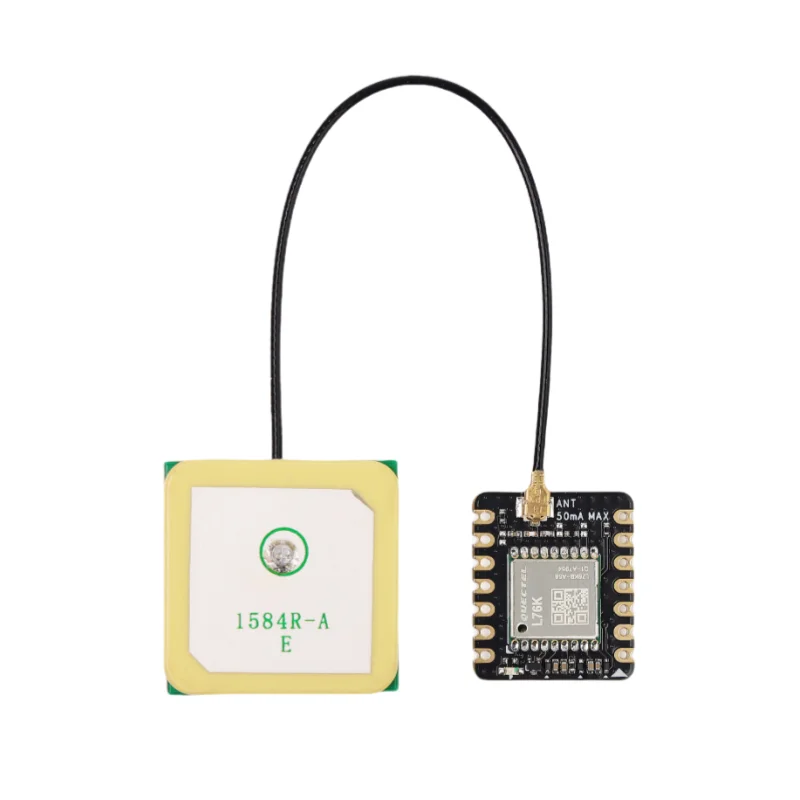
Connect the L76K GNSS add-on to a XIAO ESP32-S3 and read a first position using Arduino. The procedure separates three checks: UART data arriving, valid NMEA sentences being decoded, and a fresh satellite position fix.
Identify L76K and its antenna
Confirm the add-on is the Quectel L76K version in the linked product, not a different L76-family board. Fit its supplied compatible antenna with power disconnected and check the connector is fully seated. The antenna needs a useful view of the sky; a powered receiver indoors may send serial data without obtaining a position.
Mount the module on a XIAO
- Disconnect USB and any battery before fitting the headers.
- Align the XIAO ESP32-S3 and GNSS add-on according to their markings; inspect both header rows.
- Check the manufacturer's pinout for the actual module revision before applying power.
- Use the XIAO_ESP32S3 Arduino target and verify its USB serial test first.
This example targets a XIAO ESP32-S3. For other XIAO models use their supported serial peripheral and header mapping; do not copy the underlying S3 GPIO numbers.
Check UART routing and speed
| Function | XIAO ESP32-S3 example | Meaning |
|---|---|---|
| Receive GNSS data | D7 / UART RX | Connects to the GNSS transmitter |
| Send commands to GNSS | D6 / UART TX | Connects to the GNSS receiver |
| Initial GNSS serial speed | 9600 baud, 8N1 | Factory starting point for this L76K workflow |
| PC Serial Monitor | 115200 baud | Separate USB debug connection |
The add-on provides the power/header routing when mounted correctly. If wiring separately, follow its supply and logic ratings and cross TX to RX with a common ground. Do not use RS-232 voltage levels. A receiver whose baud rate was changed by earlier firmware needs its actual configured rate.
Install the NMEA parser
In Arduino Library Manager install TinyGPSPlus by Mikal Hart. Accept the listed dependencies. Create a new sketch, paste the complete example, click Verify, then Upload. Keep a record of your board profile and library versions when reporting an issue.
The example uses ESP32 hardware UART 1 with explicitly assigned D7/D6 pins. No SoftwareSerial library is required for this S3 version. Keep loop() processing incoming bytes continuously; long delays can drop sentences.
Read a fresh position fix
Upload, then move the antenna to a location with a clear sky view and open Serial Monitor. Character count should rise even while the receiver is still acquiring satellites. Latitude and longitude print only after the parser reports a recent valid position.
#include <Arduino.h>
#include <TinyGPSPlus.h>

HardwareSerial gnss(1);
TinyGPSPlus gps;
unsigned long lastReport = 0;
void setup() {
  Serial.begin(115200);
  delay(1500);
  // L76K on XIAO ESP32-S3: receiver RX=D7, TX=D6, 9600 baud.
  gnss.begin(9600, SERIAL_8N1, D7, D6);
}
void loop() {
  while (gnss.available()) gps.encode((char)gnss.read());
  if (millis() - lastReport >= 1000) {
    lastReport = millis();
    Serial.printf("Characters: %lu | Satellites: %lu | ",
      gps.charsProcessed(), gps.satellites.isValid() ? gps.satellites.value() : 0UL);
    if (gps.location.isValid() && gps.location.age() < 5000) {
      Serial.printf("Lat: %.6f | Lon: %.6f\n", gps.location.lat(), gps.location.lng());
    } else Serial.println("Waiting for a fresh position fix.");
  }
}
Distinguish data from a position fix
- If Characters remains zero, investigate UART routing, power and baud rate first.
- If Characters rises but no position appears, check the antenna and reception location.
- Allow time for a cold acquisition after power-up; an immediate fix is not guaranteed.
- When coordinates appear, confirm that their age remains recent while new data arrives.
The code suppresses stale coordinates after five seconds without a fresh location update. A growing character count alone does not prove that the configured baud or sentence format is correct. When diagnosing a decode failure, inspect the incoming NMEA text and the parser's checksum/error counters before changing positioning settings.
Troubleshooting
| Symptom | Check next |
|---|---|
| No characters received | Check board alignment, GNSS power, D7 RX route and the current baud rate. |
| Unreadable raw serial data | Check baud rate, UART format and shared ground. |
| Data arrives but no fix | Check antenna connection and sky view; serial communication and satellite reception are different tests. |
| Position persists after disconnecting antenna | Check age of the last valid fix; the example only prints recently updated coordinates. |
| Works until another serial peripheral is added | Reserve UART 1 and D6/D7 for GNSS or deliberately choose a different supported UART/pin route. |
References and further reading
Related product
Share the product link, hardware revision, software version and any error messages.
Contact ESP32S support →