Grove Base for XIAO: ESP32 Port Mapping and I2C Test
Use Grove Base with XIAO ESP32-C3, map Grove connectors to D pins, scan the shared I2C bus and check power and battery limitations.
On this page
Distinguish the Base from a complete controllerMount the XIAO and identify the portsCheck the voltage before connecting a sensorUpload a shared-bus I2C scannerRead the result and add devices incrementallyBattery and flash pads are optional hardware tasksTroubleshootingDownloads and reference versionsProduct and related tutorials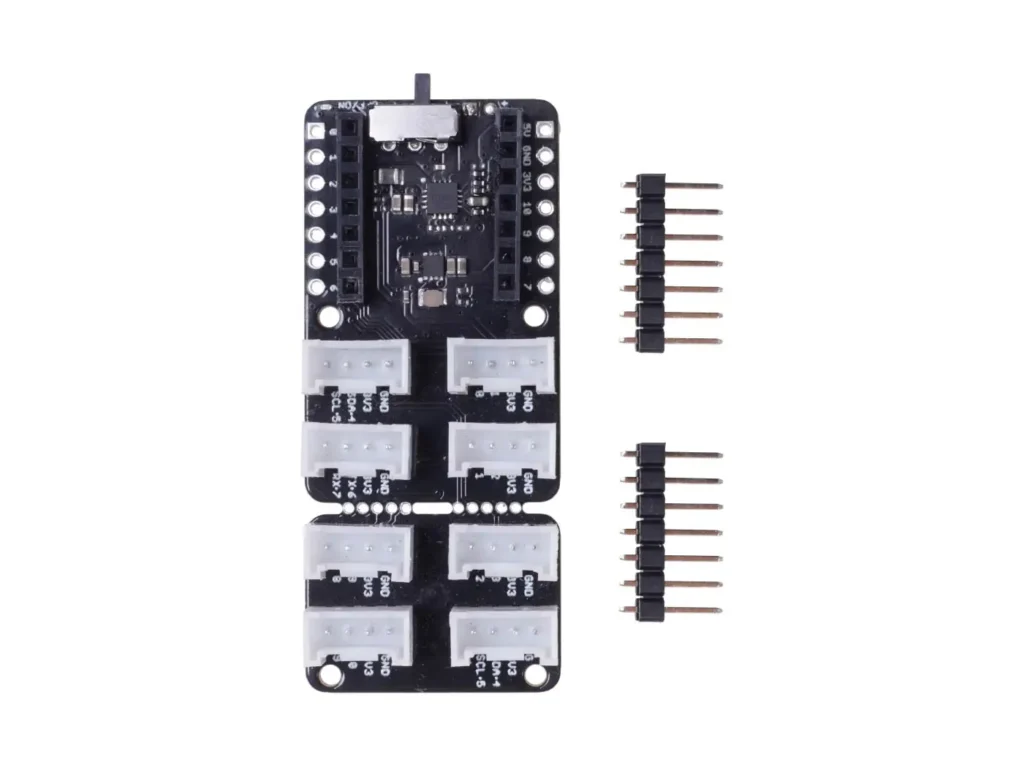
Distinguish the Base from a complete controller
Grove Base for XIAO is an expansion board; a XIAO controller and sensors are separate unless your selected package explicitly includes them. It has eight Grove connectors, including two I2C connectors and one UART connector, plus battery-management hardware. This is different from the larger XIAO Expansion Base with OLED, button and other peripherals. The tutorial below uses a XIAO ESP32-C3 and USB power.
Mount the XIAO and identify the ports
- Disconnect power, match the USB/socket orientation to the Base diagram and seat the controller without a one-pin offset.
- Use the connector marked I2C for an I2C sensor. D0/D1/D2 connectors are not automatically I2C connectors.
- For the C3 profile, SDA is XIAO D4 / GPIO6 and SCL is D5 / GPIO7. Other XIAO chips keep D labels but can use different MCU GPIO numbers.
- The Base routes existing signals; it does not add eight independent buses or fourteen additional GPIOs. Some connector signals are shared.
Check the voltage before connecting a sensor
The manufacturer pinout marks Grove power as 3V3. Verify that rail on your actual board, with common ground, before connecting a module. USB input power and GPIO signal voltage are different things. A 5 V-only Grove sensor needs its own suitable supply and signal adaptation; an identical four-pin plug does not provide level conversion. Use a known 3.3 V-compatible I2C sensor for the first test.
Upload a shared-bus I2C scanner
Select XIAO_ESP32C3 with USB CDC enabled and open Serial Monitor at 115200. This code uses Wire from Arduino-ESP32 and needs no sensor-specific library.
#include <Arduino.h>
#include <Wire.h>
void setup() {
  Serial.begin(115200);
  delay(2000);
  Wire.begin(D4, D5);  // XIAO ESP32-C3: SDA=GPIO6, SCL=GPIO7
  Wire.setClock(100000);
  Wire.setTimeOut(50);
}
void loop() {
  uint8_t found = 0;
  Serial.println("Scanning the shared Grove I2C bus...");
  for (uint8_t address = 0x08; address <= 0x77; ++address) {
    Wire.beginTransmission(address);
    uint8_t error = Wire.endTransmission();
    if (error == 0) {
      Serial.printf("ACK at 0x%02X\n", address);
      ++found;
    }
  }
  Serial.printf("Devices acknowledging: %u\n", found);
  delay(3000);
}
Read the result and add devices incrementally
An ACK address means a device responded on the bus; it does not establish the device model or prove its measurements are correct. The Base itself need not appear as an address. An empty Base with no sensor can correctly report zero devices. Connect one sensor, record its address, then try the other I2C connector: both sockets share the same bus. Two fixed-address sensors with the same address cannot be distinguished merely by putting them in separate sockets.
Battery and flash pads are optional hardware tasks
For this first tutorial, leave battery pads unconnected and use USB. Before adding a cell, check the Base revision, charging controller/current setting, cell requirements and how your XIAO version routes power. Do not join two charging outputs simply because both boards have battery pads. Reserved SPI-flash pads do not mean flash is fitted or automatically usable by firmware. Keep the board intact until the assembled project works; its breakaway section is a physical modification.
Troubleshooting
| Observation | Check next |
|---|---|
| Zero addresses with a sensor attached | Correct I2C socket, sensor rail, ground, SDA/SCL and pull-ups |
| Works alone but not with another sensor | Duplicate addresses, power demand and accumulated pull-ups |
| D numbers do not match a generic ESP32 tutorial | Use the XIAO profile and model-specific mapping |
| No OLED response | This Base has no built-in OLED; verify whether you meant the different Expansion Base |
| Sensor needs 5 V | Use a proper power/interface arrangement rather than assuming a Grove port switches voltage |
Downloads and reference versions
Download the minimal Arduino sketch (.zip)
Reviewed 22 October 2026. The minimal sketch was compiled with Arduino-ESP32 3.3.0. Its ZIP includes the source and exact board profile; compilation does not establish electrical operation or sensor accuracy. No physical bench test was performed.
Example dependencies: Wire from Arduino-ESP32; no external library.
Product and related tutorials
Share the product link, hardware revision, software version and any error messages.
Contact ESP32S support →