Grove Line Finder v1.1 with ESP32: Wiring and Black-Line Test
Connect the 5 V Grove Line Finder v1.1 through a 3.3 V logic interface and test black/white detection before building a line-following robot.
On this page
Identify the v1.1 reflectance sensorAdapt the signal voltage for ESP32Prepare the track and softwareUpload the black/white testConfirm repeatable readingsTroubleshoot a fixed or inverted resultBuild a line-following controllerDownloads, references and validationCompatible product and related tutorials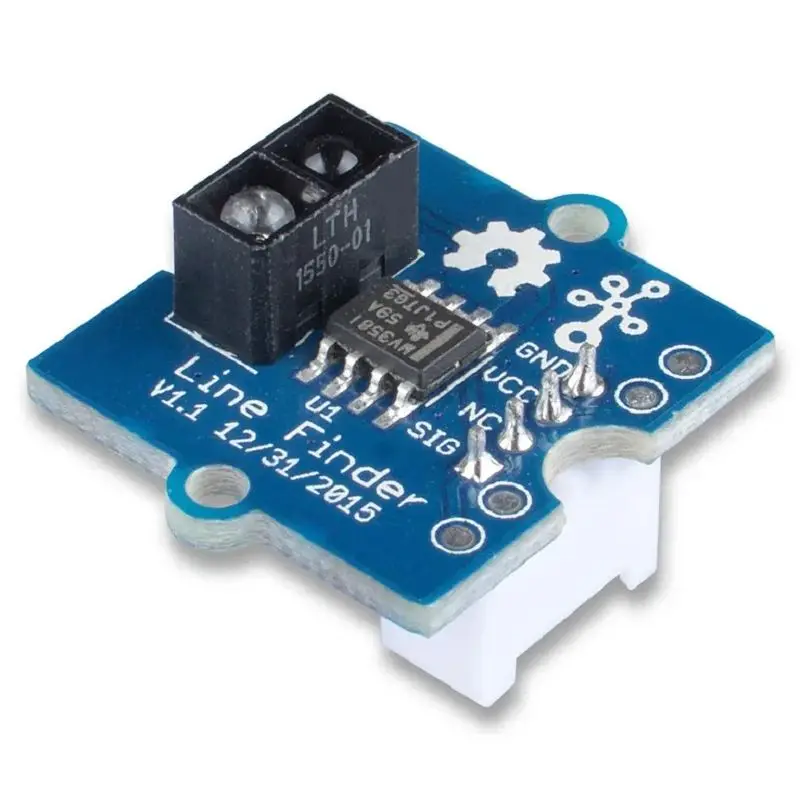
Identify the v1.1 reflectance sensor
The Grove Line Finder v1.1 combines an infrared emitter, a phototransistor and a digital threshold output. It can distinguish a dark line from a brighter background under suitable lighting and spacing. It does not return a calibrated distance or an image of the line. Confirm that the board is v1.1 before applying this wiring to another Grove line-tracking product.
Adapt the signal voltage for ESP32
Seeed specifies a 5 V supply for this model. Use a level-shifting input stage rated for a 5 V sensor output and a 3.3 V ESP32 input; do not connect the yellow SIG wire directly to GPIO merely because both boards have Grove sockets.
| Sensor connection | Destination |
|---|---|
| Red VCC | Regulated 5 V supply |
| Black GND | Supply ground and ESP32 GND |
| Yellow SIG | 5 V side of a suitable logic level shifter |
| Level-shifter 3.3 V output | ESP32-C3 GPIO4 |
| White wire | Unused for the single output |
Power the level shifter’s rails as its manufacturer specifies. With ESP32 disconnected from SIG, verify the translated HIGH level stays within the ESP32 input rail before completing the circuit.
Prepare the track and software
- Place matte black tape on a matte white surface. Secure the sensor so its height and angle remain constant.
- Start with a short sensing gap, then adjust placement and sensitivity while observing the indicator. Do not begin with a moving robot.
- Select the ESP32-C3 board and USB CDC; no external Arduino library is required for the digital read.
Upload the black/white test
#include <Arduino.h>
constexpr int LINE_PIN = 4;  // GPIO4 receives level-shifted SIG
void setup() {
  Serial.begin(115200);
  pinMode(LINE_PIN, INPUT);
}
void loop() {
  bool black = digitalRead(LINE_PIN) == HIGH;
  Serial.println(black ? "HIGH: black / weak reflection"
                       : "LOW: white / stronger reflection");
  delay(200);
}
The expected v1.1 polarity is HIGH for black/weak reflection and LOW for white/stronger reflection. This is a threshold result: a reflective dark surface can behave differently from matte black tape.
Confirm repeatable readings
Open Serial Monitor at 115200. Slide the same black and white patches under the fixed sensor several times. Record both states at your intended mounting height. Adjust the threshold and repeat under the lighting where the robot will run. Only proceed when the result is reproducible without touching the wiring.
Troubleshoot a fixed or inverted result
| Observation | Check |
|---|---|
| Always HIGH or LOW | Power, signal translation, sensing height, threshold and contrast |
| State differs from colour expectation | Surface IR reflectivity and orientation; retest with matte tape |
| Works on desk but fails near a window | Ambient light and mounting; recalibrate in the real environment |
| Robot crosses the line too far | Loop speed, motor speed, sensor spacing and turning logic, rather than only threshold |
Build a line-following controller
One sensor gives only a local black/white result. Two spaced sensors provide more useful left/right decisions; use two translated input channels. First print the two-bit state while moving the unpowered chassis by hand, define the steering table, and only then enable a motor driver. Motors need their own suitable power path and driver; GPIO cannot power them directly.
Downloads, references and validation
Download the minimal Arduino sketch (.zip)
Reviewed 21 October 2026. The downloadable minimal sketch was compiled using Arduino-ESP32 3.3.0 with the board profile recorded in its README. This checks software compilation; wiring, sensor readings and supplied hardware have not been bench-tested.
Compatible product and related tutorials
Share the product link, hardware revision, software version and any error messages.
Contact ESP32S support →