ReSpeaker Lite with ESP32-S3: Home Assistant Setup
Identify both USB ports, match XMOS I2S firmware, test microphone input and follow the ESPHome path into Home Assistant.
On this page
Identify both USB portsMatch the audio firmware to the applicationRun a minimal I2S input checkPrepare the Home Assistant configurationJoin Home Assistant and choose the voice pipelineVerify one stage at a timeTroubleshootingSoftware versions and validationDownloads and referencesRelated products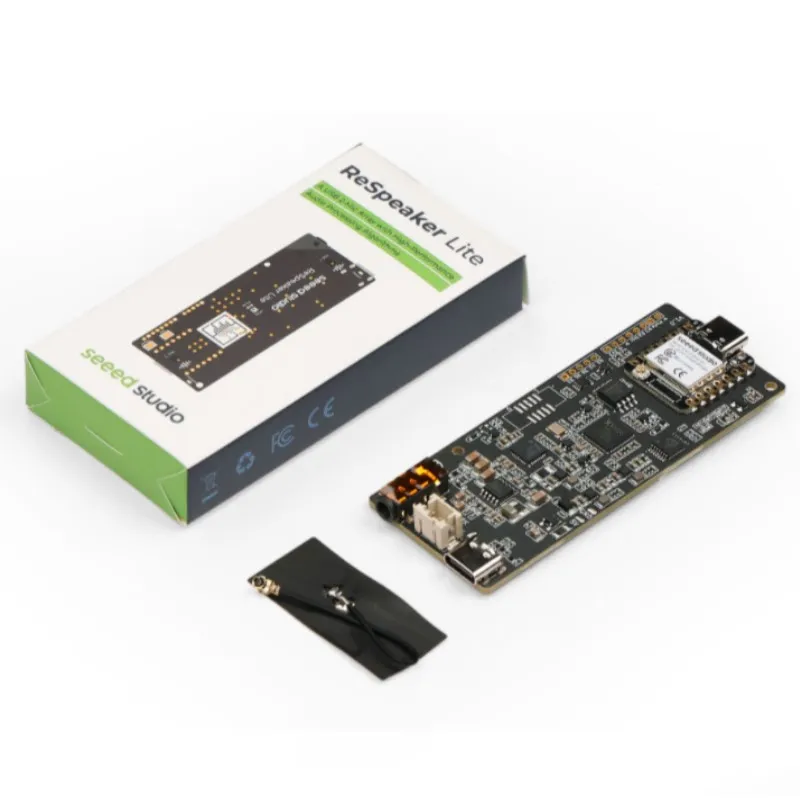
Bring up the ReSpeaker Lite kit with its pre-soldered XIAO ESP32S3, check microphone input and then connect it to Home Assistant. Treat the XMOS audio firmware and the XIAO application as two separate update paths.
Identify both USB ports
| Connection | Purpose |
|---|---|
| XIAO ESP32S3 USB-C | Arduino/ESPHome application upload and its serial console |
| ReSpeaker Lite XMOS USB-C near audio jack | USB audio or XMOS firmware update, depending on the installed firmware |
The XU316 handles audio processing such as echo/noise reduction. Speech recognition, intent handling and the Home Assistant voice pipeline are application services; microphone hardware alone does not supply a complete offline language model.
Match the audio firmware to the application
The XMOS chip has USB-audio and I2S firmware profiles. A standalone USB recording test needs a USB profile. Communication with the XIAO uses an I2S profile. Record its filename, version and sample rate before changing it.
The following input sketch uses the manufacturer’s 16 kHz, 16-bit stereo I2S pin assignment. Do not apply it unchanged to a 48 kHz profile. The Home Assistant route documented by Seeed uses a different 48 kHz firmware; change the XMOS profile when moving between those workflows.
Run a minimal I2S input check
Select XIAO_ESP32S3 with USB CDC output enabled and upload through the XIAO port. The compile-checked sketch uses the built-in ESP_I2S library and the kit’s documented BCLK/WS/data pins. It prints sample statistics rather than claiming a calibrated audio or hardware pass result.
#include <ESP_I2S.h>
I2SClass audio;
int16_t samples[512];
void setup() {
  Serial.begin(115200); delay(2000);
  audio.setPins(8, 7, 43, 44); // BCLK, WS, ESP TX, ESP RX on XIAO kit
  if (!audio.begin(I2S_MODE_STD, 16000, I2S_DATA_BIT_WIDTH_16BIT,
                   I2S_SLOT_MODE_STEREO)) {
    Serial.println("I2S init failed"); while (true) delay(1000);
  }
  Serial.println("Requires matching 16 kHz XMOS I2S firmware, not USB audio firmware.");
}
void loop() {
  size_t bytes = audio.readBytes((char*)samples, sizeof(samples));
  size_t count = bytes / sizeof(int16_t);
  if (!count) { Serial.println("No I2S bytes"); delay(500); return; }
  int16_t minimum = 32767, maximum = -32768;
  uint32_t nonzero = 0;
  for (size_t i=0; i<count; ++i) {
    if (samples[i] < minimum) minimum = samples[i];
    if (samples[i] > maximum) maximum = samples[i];
    if (samples[i] != 0 && samples[i] != -1) ++nonzero;
  }
  Serial.printf("Samples=%u min=%d max=%d not_0_or_FFFF=%lu\n",
    (unsigned)count, minimum, maximum, (unsigned long)nonzero);
  delay(250);
}
Check that a sample stream is received and changes when speaking near the microphones or using the mute control. Constant samples or silence call for a firmware/pin/power check; this test by itself cannot prove that the board is defective or that its complete speaker path works.
Prepare the Home Assistant configuration
- Use the matching ReSpeaker Lite ESPHome integration linked from the current manufacturer Home Assistant guide. Save the configuration revision and ESPHome version together.
- Select the XMOS 48 kHz I2S profile required by that integration. Its firmware update uses the XMOS USB port and the manufacturer DFU procedure, not an ESP32 web flasher.
- Install ESPHome Device Builder in a suitable Home Assistant installation, or use a supported standalone ESPHome setup.
- Create a device and apply the complete matching ReSpeaker configuration. Set Wi-Fi and API credentials in your local secrets/configuration. Do not copy credentials from someone else’s example.
- Build successfully, save the resulting factory-format firmware and flash it through the XIAO USB port. Keep the matching configuration for later upgrades.
Join Home Assistant and choose the voice pipeline
After the application joins Wi-Fi, add the discovered ESPHome device under Home Assistant Devices & Services. If discovery fails, check the device IP, network reachability and API encryption settings before changing microphone pins. Assign a working Assist pipeline with speech-to-text, conversation handling and text-to-speech. Cloud and local services have different setup requirements; the kit does not include those services automatically.
Verify one stage at a time
Start with a button/manual Assist interaction, then check wake-word detection, recognized text and speaker playback separately. Begin at low volume with a suitable speaker. If a 3.5 mm plug is inserted, check the board’s output-routing behavior before concluding that the speaker connector failed.
Troubleshooting
| Symptom | Check next |
|---|---|
| Not a USB sound card | Confirm that the computer is on the XMOS port and that a USB-audio profile is installed. |
| Arduino uploads but audio is constant | Check XMOS I2S mode, 16 kHz profile, kit pins and mute state. |
| ESPHome build fails | Use the integration’s matched configuration/ESPHome version; preserve the actual compiler error. |
| Device joins Wi-Fi but Assist fails | Check ESPHome API, Assist pipeline and service availability independently. |
| No XIAO upload port | Enter XIAO BOOT mode on its own USB port; the carrier USR/Mute buttons are different controls. |
Software versions and validation
Documentation reviewed on October 21, 2026. The included minimal sketch was compile-checked with Arduino-ESP32 3.3.0; library versions are listed below. Compilation does not replace a test on your physical module.
Only Arduino-ESP32 built-in APIs are required for the supplied example.
Downloads and references
- Seeed ReSpeaker Lite kit
- Seeed I2S test profile and pins
- Seeed Home Assistant workflow
- Current ReSpeaker Lite firmware repository
- Seeed supported FAQ and version notes
- Espressif Arduino-ESP32 documentation
Download the minimal Arduino sketch (.zip)
Related products
Share the product link, hardware revision, software version and any error messages.
Contact ESP32S support →