HMMD S3KM1110 with ESP32: Presence & UART Setup
Wire the HMMD radar to ESP32, check OT2 presence, inspect binary UART reports and read firmware information before adjusting detection settings.
On this page
Identify HMMD rather than another radar boardPower and wire the moduleCheck OT2 presence status firstRead UART diagnosticsInspect before changing parametersSeparate installation effects from faultsTroubleshootingSoftware versions and validationDownloads and referencesRelated products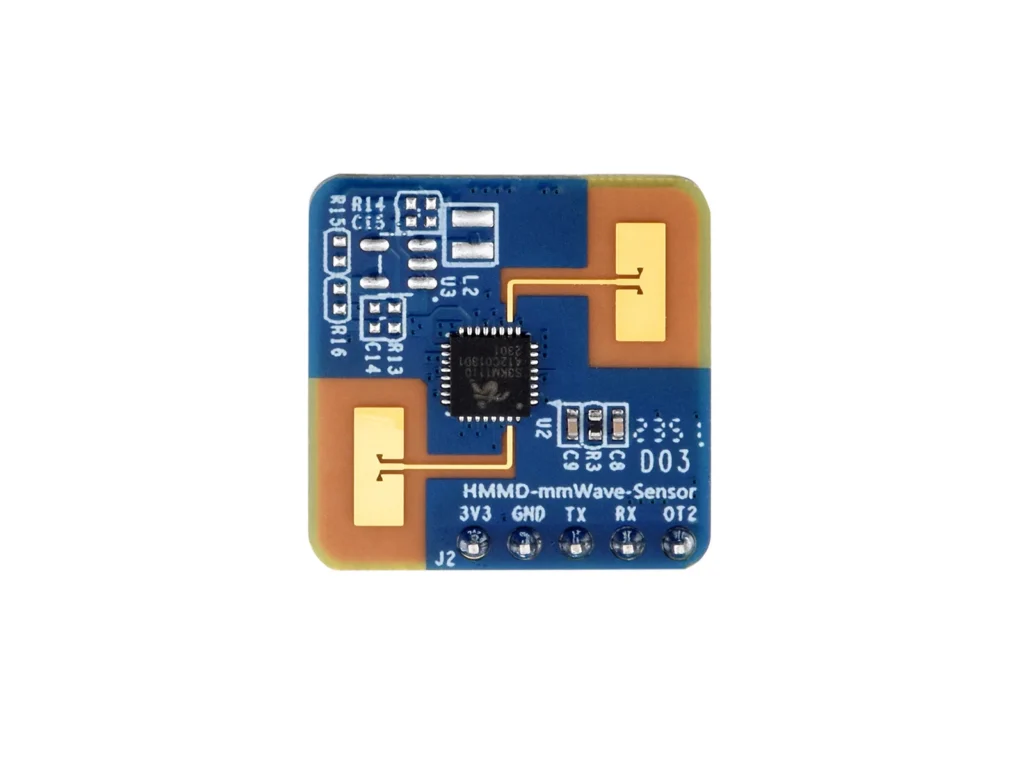
Test presence sensing on the HMMD S3KM1110 module with an ESP32. Begin with its OT2 digital status, then inspect the UART byte stream and query the firmware version without changing the stored radar configuration.
Identify HMMD rather than another radar board
This guide follows the HMMD module with S3KM1110, a five-signal J2 connection and 3.3 V power. An LD2410, LD1020 or an ESP32S Presence Radar assembly has different connections or protocols. Chip frequency alone does not make firmware interchangeable.
Power and wire the module
Install esp32 by Espressif Systems in Arduino Boards Manager. The C3 examples use ESP32C3 Dev Module with USB CDC On Boot enabled and Serial Monitor at 115200 baud. Start with a working Arduino upload setup, then disconnect power before changing wires.
| HMMD signal | ESP32-C3 example |
|---|---|
| 3V3 | 3V3 from a stable supply with sufficient current |
| GND | GND |
| TX | GPIO6, the ESP32 UART receive input |
| RX | GPIO7, the ESP32 UART transmit output |
| OT2 | GPIO4, digital input |
The manufacturer specifies a 3.0–3.6 V supply and 0–3.3 V UART signals. This is not a 5 V VIN module. Its normal average current is around 50 mA, so supply capability and wiring quality matter.
Check OT2 presence status first
In the documented configuration OT2 goes high for presence and low for absence after the configured disappearance delay. Keep the module stationary, move in front of it and then leave the detection area. A delayed low transition can be normal timer behavior.
Read UART diagnostics
The protocol uses 115200 baud, 8 data bits, no parity and one stop bit. Reports are binary; ordinary text terminals can show apparent garbage. The sketch prints hexadecimal bytes and sends the documented read-only firmware-version request once at startup.
#include <HardwareSerial.h>
HardwareSerial radar(1);
constexpr uint8_t PRESENCE_PIN = 4;
const uint8_t readVersion[] = {0xFD,0xFC,0xFB,0xFA,0x02,0x00,
                               0x00,0x00,0x04,0x03,0x02,0x01};
void setup() {
  Serial.begin(115200); delay(1500);
  pinMode(PRESENCE_PIN, INPUT);
  radar.begin(115200, SERIAL_8N1, 6, 7); // ESP32 RX=6, TX=7
  delay(1000);
  radar.write(readVersion, sizeof(readVersion)); // Read-only firmware query
  Serial.println("HMMD RX bytes below are hexadecimal, not ASCII text.");
}
void loop() {
  static int previous = -1;
  int present = digitalRead(PRESENCE_PIN);
  if (present != previous) {
    Serial.printf("\nOT2 presence=%d\n", present); previous = present;
  }
  while (radar.available()) Serial.printf("%02X ", (uint8_t)radar.read());
  delay(10);
}
Inspect before changing parameters
A valid response uses the documented frame boundaries and length; a stream of bytes alone is not a verified range measurement. Check the linked protocol before decoding its distance/energy fields. Save the current firmware and settings before making a change.
For configuration, use the matching HMMD host tool and its protocol documentation. Set the farthest distance gate and disappearance delay deliberately, then repeat a walk-in/walk-out test. Do not assume the range in one mounting orientation applies to every installation.
Separate installation effects from faults
Mount the antenna with the recommended orientation and keep moving fans, curtains and nearby vibrating objects in mind. Compare a quiet empty room with one controlled moving target. A radar can respond to movement outside the area a user intuitively considers “in front” if the mounting or surrounding material allows it.
Troubleshooting
| Symptom | Check next |
|---|---|
| No UART bytes | Cross TX/RX correctly, use common ground and confirm 115200/8N1. |
| Text looks unreadable | The stream is binary; inspect hex frames rather than ASCII characters. |
| Always present | Check disappearance delay, nearby movement and mounting before reducing sensitivity. |
| OT2 works, UART does not | Inspect signal wiring and whether the selected operating mode emits periodic reports. |
| ESP32 resets | Measure the 3.3 V rail and improve supply/current capacity before changing software. |
Software versions and validation
Documentation reviewed on October 21, 2026. The included minimal sketch was compile-checked with Arduino-ESP32 3.3.0; library versions are listed below. Compilation does not replace a test on your physical module.
Only Arduino-ESP32 built-in APIs are required for the supplied example.
Downloads and references
- HMMD manufacturer hardware, UART protocol and tools
- ESP32 HardwareSerial API
- Espressif Arduino-ESP32 documentation
Download the minimal Arduino sketch (.zip)
Related products
Share the product link, hardware revision, software version and any error messages.
Contact ESP32S support →