PAJ7660 with ESP32: I2C Gesture Sensor Tutorial
Select the PAJ7660 I2C switch mode, use the correct pag7660 driver and test finger counts, rotation and swipes with ESP32.
On this page
Identify the correct product and driverChoose I2C on the rear switchesConnect the Grove portInstall the matching Grove libraryRead combined-mode gesturesMake the first recognition test repeatableTroubleshootingSoftware versions and validationDownloads and referencesRelated products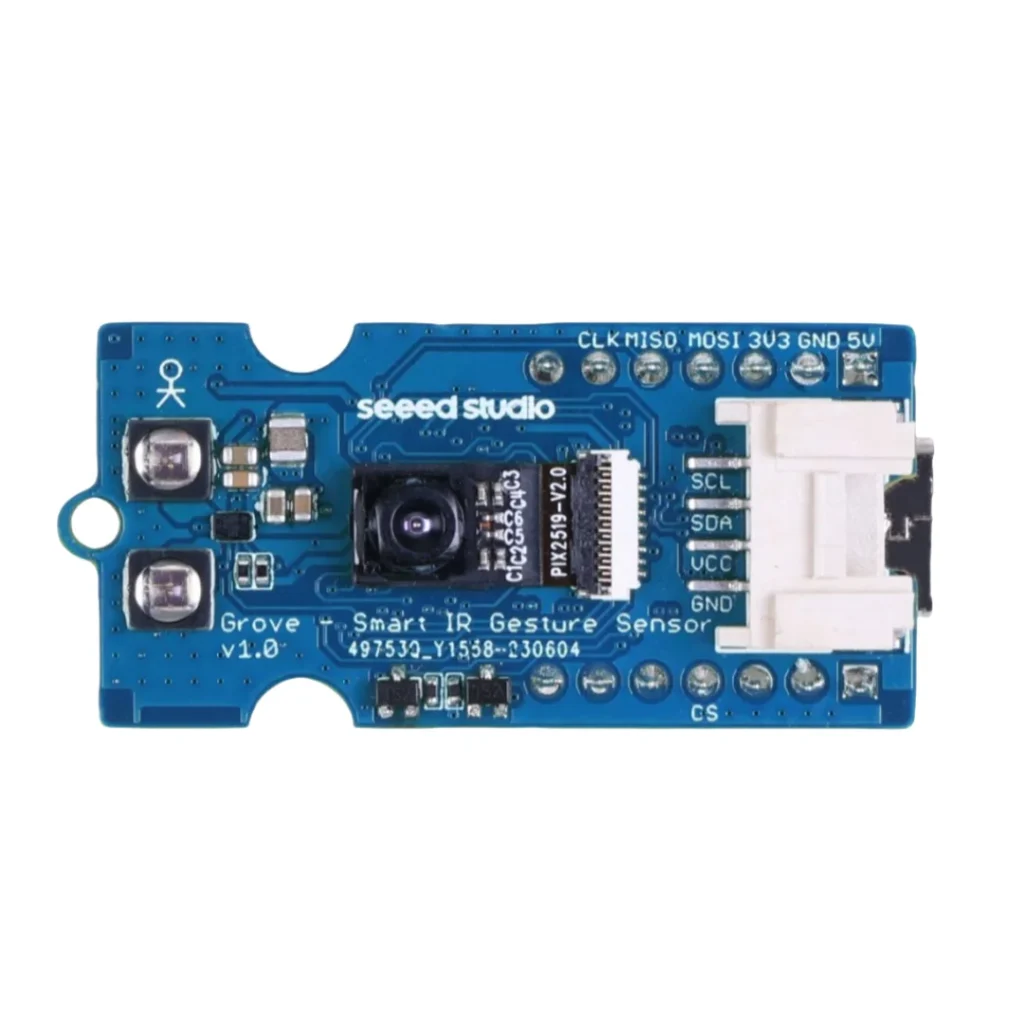
Read gestures from the Grove Smart IR Gesture Sensor PAJ7660 using an ESP32 and its I2C connection. This guide focuses on a known communication mode before considering the separate USB viewer or SPI connection.
Identify the correct product and driver
The store product is described as PAJ7660. The Seeed Grove_Gesture library exposes its API as pag7660 and pag7660_gesture_t; that spelling difference is expected. Do not replace the object with the library’s separate paj7620 class.
Choose I2C on the rear switches
| DIP position | 1 | 2 | 3 | 4 |
|---|---|---|---|---|
| I2C | ON | OFF | ON | ON |
| SPI | ON | ON | ON | ON |
| USB viewer | OFF | OFF | OFF | OFF |
Power off while moving the mode switches. Use the printed ON mark and the manufacturer orientation, not an assumption that “up” always means ON. A correct cable cannot compensate for choosing USB or SPI mode while running I2C code.
Connect the Grove port
Install esp32 by Espressif Systems in Arduino Boards Manager. The C3 examples use ESP32C3 Dev Module with USB CDC On Boot enabled and Serial Monitor at 115200 baud. Start with a working Arduino upload setup, then disconnect power before changing wires.
| Grove signal | ESP32-C3 example | Purpose |
|---|---|---|
| VCC | 3V3 | 3.3 V module supply for this example |
| GND | GND | Common reference |
| SDA | GPIO6 | I2C data |
| SCL | GPIO7 | I2C clock |
These are GPIO numbers on the ESP32-C3 Supermini, not physical header numbers. Identify the Grove contacts from the module labels; cable color is only an aid. For another ESP32 board select free pins using its pinout and change the code. Keep I2C pull-ups at 3.3 V.
For this C3 example the sensor is connected by its Grove I2C port. It is not a physical plug-on fit for the C3 Supermini. The module’s XIAO socket is a separate connection method and must be oriented as the manufacturer specifies.
Install the matching Grove library
Install Seeed-Studio/Grove_Gesture as a ZIP library using Arduino Sketch → Include Library → Add .ZIP Library. The reviewed release reports library version 2.1.0. The sketch sets the ESP32 Wire pins before the driver initializes the bus.
Read combined-mode gestures
#include <Wire.h>
#include <Gesture.h>
pag7660 gesture;  // PAJ7660 product uses the library's pag7660 class
void setup() {
  Serial.begin(115200); delay(1500);
  Wire.setPins(6, 7);  // ESP32-C3 example SDA, SCL
  if (!gesture.init()) {
    Serial.println("Gesture init failed: check I2C DIP mode and wiring.");
    while (true) delay(1000);
  }
  Serial.println("Combined gesture mode ready; present hand upright at 15-30 cm.");
}
void loop() {
  pag7660_gesture_t result;
  if (gesture.getResult(result)) {
    if (result.type >= 1 && result.type <= 5)
      Serial.printf("Static fingers: %d\n", result.type);
    else if (result.type == 6 || result.type == 7)
      Serial.printf("Rotation type=%d angle=%d\n", result.type, result.rotate);
    else if (result.type == 8 || result.type == 9)
      Serial.printf("Swipe type: %d\n", result.type);
    else if (result.type >= 19 && result.type <= 23)
      Serial.printf("Finger push: %d\n", result.type - 18);
    else if (result.type == 0 && result.cursor.select)
      Serial.printf("Selected cursor gesture: %d\n", result.cursor.type);
  }
  delay(100);
}
Make the first recognition test repeatable
Place the sensor upright according to its orientation mark, begin with a hand about 15–30 cm away and leave space behind it. Start with a static finger count, then a slow swipe. Highly reflective backgrounds, an upside-down board or operating too close can affect recognition.
Combined mode does not report every thumb-mode gesture. First verify that the mode in the code matches the action being tested. Do not declare a hardware failure because a gesture from another mode is absent.
Troubleshooting
| Symptom | Check next |
|---|---|
| Initialization failed | Check ON/OFF pattern, Grove wiring, power and pag7660 object. |
| No thumb-up result | The minimal sketch uses combined mode; the manufacturer has a separate thumb mode. |
| Unexpected directions | Check the upright orientation mark and your hand movement. |
| Repeated or unstable results | Use a consistent distance and remove a close reflective background. |
| USB viewer works but Arduino does not | Return the switches to I2C before testing the Grove connection. |
Software versions and validation
Documentation reviewed on October 21, 2026. The included minimal sketch was compile-checked with Arduino-ESP32 3.3.0; library versions are listed below. Compilation does not replace a test on your physical module.
Grove Gesture 2.1.0
Downloads and references
- Seeed PAJ7660 hardware modes and gestures
- Seeed Grove_Gesture driver source
- Espressif Arduino-ESP32 documentation
Download the minimal Arduino sketch (.zip)
Related products
Share the product link, hardware revision, software version and any error messages.
Contact ESP32S support →