BME680 with ESP32: Environment & Raw Gas Readings
Read temperature, humidity, pressure and gas resistance while keeping raw measurements separate from IAQ or CO2 estimates.
On this page
Identify BME680 and raw gas resistancePrepare an open-air first testWire the I2C breakoutInstall the environmental driverRead the four output fieldsUnderstand what further processing addsTroubleshootingReferences and next stepsRelated product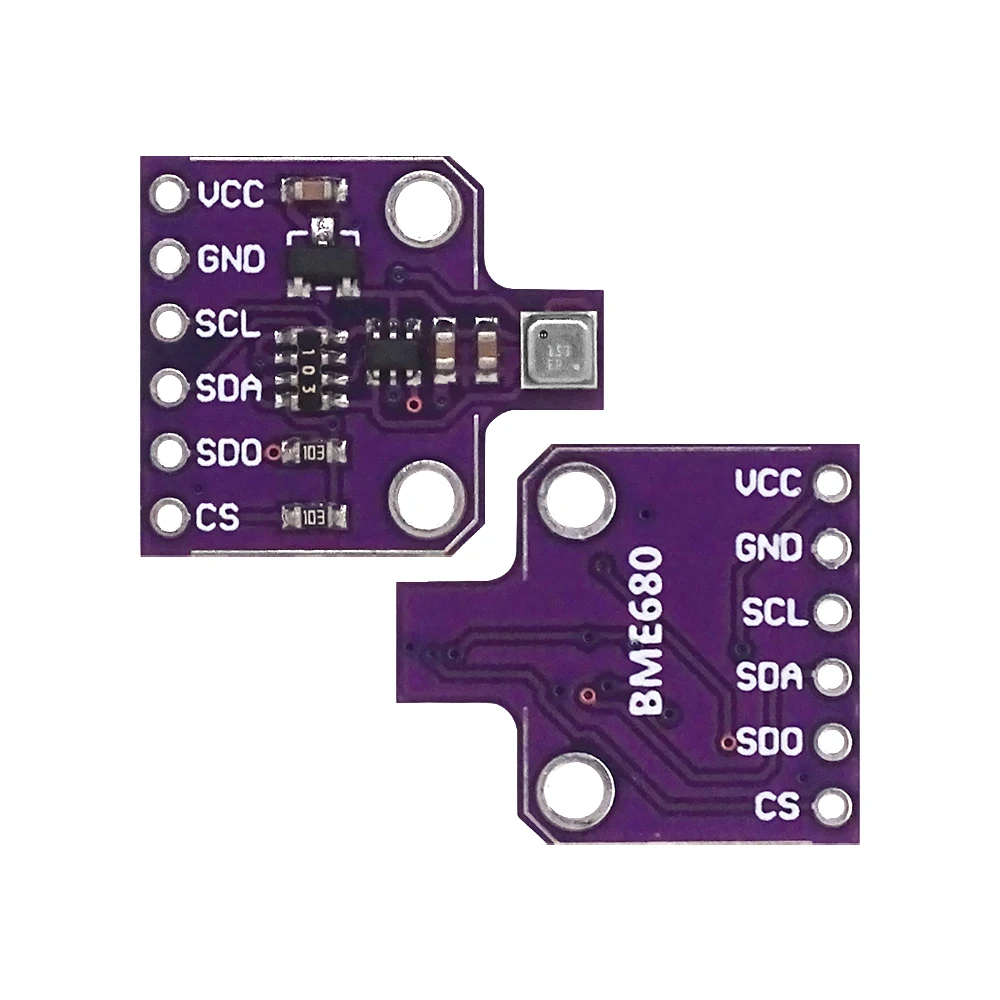
Read temperature, humidity, pressure and raw gas resistance from a BME680 breakout using an ESP32. This first tutorial keeps the raw sensor outputs distinct from air-quality indexes or gas-concentration estimates that require additional processing.
Identify BME680 and raw gas resistance
Confirm BME680 on the module before selecting a driver. BME280 and BMP280 do not provide the same gas-sensing channel. The example prints gas resistance in ohms, not CO₂ ppm or a ready-made IAQ score. A change in resistance can have several causes and should not be labelled as a measured concentration of one specific gas.
Prepare an open-air first test
The controller for this example is an ESP32-C3 Supermini. Confirm that its USB upload and serial test works before adding the module. Use ESP32C3 Dev Module with USB CDC On Boot enabled for native USB, and open Serial Monitor at 115200 baud. Disconnect power while changing wires.
Use the breakout's supported 3.3 V supply configuration and short wires. Keep the sensing opening clear and place the board away from ESP32/regulator heat. Gas readings depend on the heater cycle, operating history and environment; inspect trends over time rather than expecting a stable universal number on the first boot.
Wire the I2C breakout
| Module label | ESP32-C3 example | Purpose |
|---|---|---|
| VCC / VIN | 3V3 | 3.3 V logic supply for this setup |
| GND | GND | Common ground |
| SDA | GPIO6 | I2C data |
| SCL | GPIO7 | I2C clock |
GPIO6 and GPIO7 are explicit assignments for this C3 example. They are not physical header positions or universal ESP32 defaults. For another board, select free exposed pins using its own pinout and update Wire.begin(). Keep ESP32 I2C pull-ups at 3.3 V.
BME680 I2C addresses are typically 0x76 or 0x77 depending on the SDO/address configuration. On a breakout exposing SPI straps, configure CS/SDO according to that board's I2C instructions. Do not assume a module advertised for multiple interfaces is already strapped for the one you intend to use.
Install the environmental driver
In Arduino Library Manager install Adafruit BME680 Library and its listed dependencies, including Adafruit BusIO and Adafruit Unified Sensor. Accept the required dependencies. Paste the complete example into a new sketch, click Verify, then Upload. If reporting a problem, include the board profile, package version and library version.
Change begin(0x77) to 0x76 if that is the responding address. The example explicitly configures temperature, humidity and pressure oversampling, then uses a 320 °C / 150 ms sensor heater setting for gas acquisition. This is the tiny sensor heater setting, not a target ambient temperature.
Read the four output fields
Pressure from the API is in pascals, so the sketch divides by 100 to print hPa. It prints raw gas resistance directly in ohms and reports failed measurement calls instead of using stale output values.
#include <Arduino.h>
#include <Wire.h>
#include <Adafruit_BME680.h>

Adafruit_BME680 environment(&Wire);
void setup() {
  Serial.begin(115200);
  delay(1500);
  Wire.begin(6, 7);
  if (!environment.begin(0x77)) { // Use 0x76 if your board's address differs.
    Serial.println("BME680 not found; check sensor model, address and bus mode.");
    while (true) delay(1000);
  }
  environment.setTemperatureOversampling(BME680_OS_8X);
  environment.setHumidityOversampling(BME680_OS_2X);
  environment.setPressureOversampling(BME680_OS_4X);
  environment.setIIRFilterSize(BME680_FILTER_SIZE_3);
  environment.setGasHeater(320, 150); // Heater temperature C and duration ms.
}
void loop() {
  if (!environment.performReading()) {
    Serial.println("Reading failed.");
  } else {
    Serial.printf("%.2f C | %.2f %%RH | %.2f hPa | Gas: %lu ohms\n",
      environment.temperature, environment.humidity, environment.pressure / 100.0f,
      (unsigned long)environment.gas_resistance);
  }
  delay(2000);
}
Understand what further processing adds
Allow the sensor and its mounting to settle before comparing readings. A raw resistance number, including a zero or a changing baseline during startup, is not a calibrated air-quality verdict. For an IAQ workflow, evaluate Bosch's supported BSEC software, its calibration/status handling and its integration requirements separately.
For actual CO₂ concentration readings, use the dedicated SCD40/SCD41 tutorial. For an altitude estimate from pressure, first define the pressure reference and account for weather; the simple raw-pressure sketch intentionally does not claim an absolute altitude.
Troubleshooting
| Symptom | What to check |
|---|---|
| Sensor not found | Check 0x76/0x77, I2C straps, correct chip family and power. |
| Temperature higher than room reference | Check local heating, placement, airflow and stabilization. |
| Pressure looks 100 times too large | Check Pa versus hPa conversion. |
| Gas value changes without a clear gas source | Check heater cycle, startup history, humidity and environmental changes; do not relabel resistance as ppm. |
| An IAQ/CO2 field is missing | Expected: this sketch prints raw sensor data, not an algorithm-derived air-quality output. |
References and next steps
- Bosch BME680 overview and processing options
- Adafruit BME680 driver
- BME680 API and data units
- ESP32 I2C API
Related product
BME680 Digital Temperature Humidity Pressure Sensor High Altitude Module Development Board →
Share the product link, hardware revision, software version and any error messages.
Contact ESP32S support →