VL53L0X with ESP32: ToF Distance & Status Checks
Connect the I2C ranging breakout, use the correct address and report distance only when measurement status is valid.
On this page
Identify VL53L0X and the optical openingPrepare the controllerWire the I2C ranging moduleInstall the correct ranging driverRead distance and statusCheck the first distance readingsTroubleshootingReferences and next stepsRelated productUsing the Grove VL53L0X version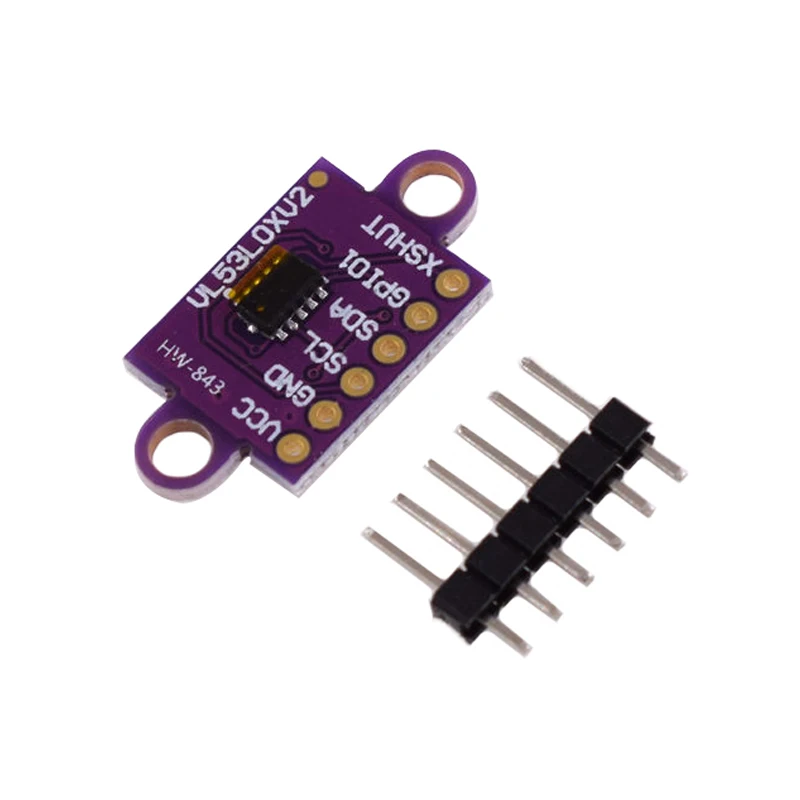
Read distance from the GY-VL53L0XV2 / VL53L0X breakout with an ESP32. This tutorial checks the sensor address and measurement status, rather than assuming every returned number represents a valid distance.
Identify VL53L0X and the optical opening
Confirm the actual sensor model before installing the driver: VL53L0X and VL53L1X use different libraries. Inspect the optical window for protective film or an obstruction. Begin with a flat, non-transparent target at a moderate distance; do not use a shiny angled surface to establish the first result.
Prepare the controller
The controller for this example is an ESP32-C3 Supermini. Confirm that its USB upload and serial test works before adding the module. Use ESP32C3 Dev Module with USB CDC On Boot enabled for native USB, and open Serial Monitor at 115200 baud. Disconnect power while changing wires.
The linked product is a breakout board, not a bare sensor. Use a 3.3 V setup supported by that breakout and keep I2C levels compatible with the ESP32. Leave additional peripherals out until ranging is stable.
Wire the I2C ranging module
| Module label | ESP32-C3 example | Purpose |
|---|---|---|
| VCC / VIN | 3V3 | 3.3 V logic supply for this setup |
| GND | GND | Common ground |
| SDA | GPIO6 | I2C data |
| SCL | GPIO7 | I2C clock |
GPIO6 and GPIO7 are explicit assignments for this C3 example. They are not physical header positions or universal ESP32 defaults. For another board, select free exposed pins using its own pinout and update Wire.begin(). Keep ESP32 I2C pull-ups at 3.3 V.
The usual seven-bit address is 0x29. A document using 0x52 may be showing an eight-bit address byte rather than the seven-bit address expected by Wire. XSHUT is an active-low shutdown signal; keep it in the breakout's documented enabled state. Do not assume an exposed XSHUT pin can accept the same voltage as a regulated VIN input. GPIO1/interrupt is not needed for this polling example.
Install the correct ranging driver
In Arduino Library Manager install Adafruit VL53L0X. Accept the required dependencies. Paste the complete example into a new sketch, click Verify, then Upload. If reporting a problem, include the board profile, package version and library version.
Use the complete example below with the correct board target. If initialization fails, confirm a 0x29 I2C response and check power and shutdown wiring before editing measurement settings.
Read distance and status
A valid sample prints millimetres. The sketch accepts RangeStatus=0 together with a successful driver call; other statuses are reported as invalid instead of being displayed as a usable range.
#include <Arduino.h>
#include <Wire.h>
#include <Adafruit_VL53L0X.h>

Adafruit_VL53L0X distanceSensor;
void setup() {
  Serial.begin(115200);
  delay(1500);
  Wire.begin(6, 7);
  if (!distanceSensor.begin(0x29, false, &Wire)) {
    Serial.println("VL53L0X not found; check power, address and XSHUT.");
    while (true) delay(1000);
  }
}
void loop() {
  VL53L0X_RangingMeasurementData_t sample = {};
  const VL53L0X_Error error = distanceSensor.rangingTest(&sample, false);
  if (error == VL53L0X_ERROR_NONE && sample.RangeStatus == 0) {
    Serial.printf("Distance: %u mm\n", (unsigned)sample.RangeMilliMeter);
  } else {
    Serial.printf("No valid range (error %d, status %u).\n",
                  (int)error, (unsigned)sample.RangeStatus);
  }
  delay(250);
}
Check the first distance readings
- Place a flat target square to the sensor and keep both still.
- Compare several samples with a ruler rather than judging a single update.
- Move the target through a few positions within a practical range for the setup.
- Repeat under the lighting and target conditions intended for the final project.
Maximum range depends on target reflectivity, ambient infrared light and measurement settings. A store's maximum-distance figure is not a guaranteed working distance for every object. For multiple identical sensors, manage shutdown/address assignment carefully or use a TCA9548A channel per sensor.
Troubleshooting
| Symptom | What to check |
|---|---|
| No sensor at 0x29 | Check supply, shutdown state and SDA/SCL; distinguish seven-bit and eight-bit notation. |
| Library initializes but ranges are invalid | Inspect target, optical window, lighting and measurement status. |
| Readings jump near glass or angled shiny objects | Use a flat matte target to separate setup problems from optical conditions. |
| Second sensor stops the first | Their default addresses collide unless isolated or reassigned correctly. |
| VL53L1X example does not work | Install the driver for the actual VL53L0X chip. |
References and next steps
- Adafruit VL53L0X driver
- VL53L0X API and measurement calls
- VL53L0X Arduino example workflow
- ESP32 I2C API
Related product
Using the Grove VL53L0X version
The related Grove module uses the same VL53L0X sensor, but its connector and board-level supply/level circuitry differ from a generic GY breakout. Connect using the Grove signal labels and a 3.3 V compatible bus. The distance-status checks and address-conflict guidance still apply. Do not copy an unverified physical pin order.
Related module variants in our store:
Share the product link, hardware revision, software version and any error messages.
Contact ESP32S support →