PCA9685 with ESP32: Servo Wiring, Power & PWM
Separate logic and servo power, connect the I2C driver and test one positional servo before expanding to more channels.
On this page
Separate logic power from servo powerPrepare one unloaded servoConnect I2C and external servo powerInstall the PWM driverTry a small pulse-width changeCalibrate before using all channelsTroubleshootingReferences and next stepsRelated product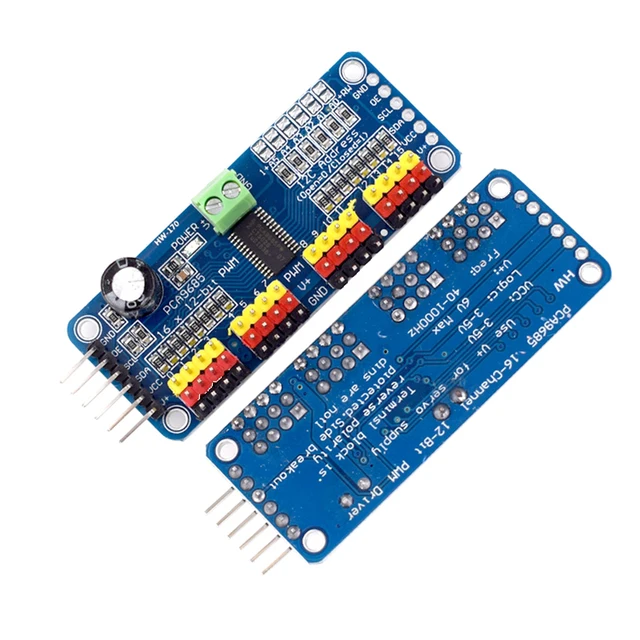
Control one positional servo from an ESP32 through the PCA9685 16-channel PWM module. Establish a small, unloaded movement first, then expand only after the servo power and pulse range have been checked.
Separate logic power from servo power
VCC powers the PCA9685 logic, while V+ supplies the servo connectors on typical breakout boards. They are separate rails. Use 3.3 V logic with the ESP32 and a separate regulated supply suitable for the chosen servo on V+. A PWM signal is not a motor-power output.
Prepare one unloaded servo
The controller for this example is an ESP32-C3 Supermini. Confirm that its USB upload and serial test works before adding the module. Use ESP32C3 Dev Module with USB CDC On Boot enabled for native USB, and open Serial Monitor at 115200 baud. Disconnect power while changing wires.
Use a positional servo rated for the 50 Hz signal in this example. Remove mechanical loads or linkages for the first movement. Continuous-rotation servos interpret the pulse differently, so they should not be expected to move to a particular angle.
Connect I2C and external servo power
| Module label | ESP32-C3 example | Purpose |
|---|---|---|
| VCC — logic only | 3V3 | 3.3 V logic supply for this setup |
| GND | GND | Common ground |
| SDA | GPIO6 | I2C data |
| SCL | GPIO7 | I2C clock |
GPIO6 and GPIO7 are explicit assignments for this C3 example. They are not physical header positions or universal ESP32 defaults. For another board, select free exposed pins using its own pinout and update Wire.begin(). Keep ESP32 I2C pull-ups at 3.3 V.
| Servo-side connection | Destination |
|---|---|
| Suitable regulated servo-supply positive | V+ terminal, within both board and servo ratings |
| Servo-supply negative | PCA9685 GND and common ESP32 GND |
| One servo signal | Channel 0 PWM |
| Servo power and return | Channel 0 V+ and GND, after checking connector labels |
Check polarity from printed labels, not wire color alone. Do not feed the servo through the ESP32 3V3 pin. Start with one servo and provide a supply that can handle its start/stall demand; the USB connection used to program the ESP32 does not establish the servo supply capacity.
Install the PWM driver
In Arduino Library Manager install Adafruit PWM Servo Driver Library and Adafruit BusIO. Accept the required dependencies. Paste the complete example into a new sketch, click Verify, then Upload. If reporting a problem, include the board profile, package version and library version.
The ordinary individual address starts at 0x40 with the standard address-link configuration. A PCA9685 may also acknowledge an All Call address, so an extra scanner response is not automatically another board. Confirm address straps if your individual address differs.
Try a small pulse-width change
The example begins at 1,500 µs, then alternates between 1,400 and 1,600 µs on channel 0. These are conservative starting values for many ordinary positional servos, not a guaranteed angle range for every servo. Stop if the mechanism binds, buzzes heavily or the supply collapses.
#include <Arduino.h>
#include <Wire.h>
#include <Adafruit_PWMServoDriver.h>

Adafruit_PWMServoDriver servos(0x40, Wire);
void setup() {
  Serial.begin(115200);
  delay(1500);
  Wire.begin(6, 7);
  if (!servos.begin()) {
    Serial.println("PCA9685 not found.");
    while (true) delay(1000);
  }
  servos.setPWMFreq(50); // For a positional servo rated for 50 Hz.
  delay(10);
  servos.writeMicroseconds(0, 1500);
  delay(2000);
}
void loop() {
  servos.writeMicroseconds(0, 1400);
  Serial.println("Channel 0: 1400 us");
  delay(2000);
  servos.writeMicroseconds(0, 1600);
  Serial.println("Channel 0: 1600 us");
  delay(2000);
}
Calibrate before using all channels
- Confirm small movement on channel 0 with no linkage attached.
- Check the actual servo pulse and supply behavior if the response is unexpected.
- Determine safe endpoints for the particular servo and mechanism gradually.
- Only then add channels, accounting for combined power demand and connector limits.
All channels share the PWM frequency on this chip. The library's microsecond conversion depends on the oscillator estimate and programmed frequency. Do not infer an exact mechanical angle from a pulse number without calibration.
Troubleshooting
| Symptom | What to check |
|---|---|
| Driver not found | Check logic VCC, common ground, address links and SDA/SCL. |
| I2C works but servo does not move | Check the separate V+ rail, channel number, servo connector orientation and output-enable state. |
| ESP32 resets when servo starts | Inspect servo supply sizing and return wiring; keep motor current out of the controller supply path. |
| Servo runs continuously | Confirm whether it is a continuous-rotation model. |
| Endpoint causes buzzing or binding | Return to the unloaded center test and calibrate a smaller safe range. |
References and next steps
Related product
PCA9685PW 16 Channel 12-Bit PWM Servo Shield Driver I2C Interface PCA9685 Module For Raspberry Pi →
Share the product link, hardware revision, software version and any error messages.
Contact ESP32S support →