Grove AHT20 with ESP32: I2C Temperature & Humidity
Connect the Grove AHT20 at 3.3V, use the correct I2C socket and read temperature and humidity with an Arduino example.
On this page
Identify the AHT20 modulePrepare the ESP32 and connectorConnect power and I2CInstall the AHT20-compatible driverRead the first measurementsCheck air exposure and temperature biasTroubleshootingReferences and further readingRelated product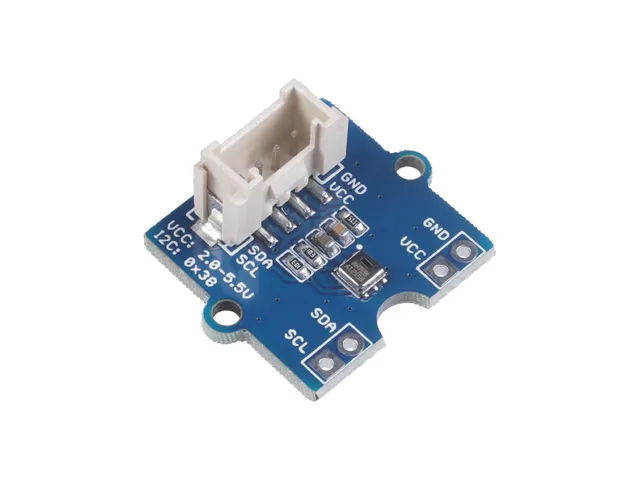
Read temperature and relative humidity from the Grove AHT20 sensor with an ESP32. The example uses the Adafruit AHTX0 driver and a clearly assigned I2C bus, so the first reading can be checked before adding networking or a display.
Identify the AHT20 module
Check the sensor name and Grove connector labels. This guide is for AHT20, not the similarly named DHT20 or a DHT22 single-wire module. The AHT20 uses I2C address 0x38. A four-wire connector does not make every Grove module electrically or logically interchangeable.
Prepare the ESP32 and connector
The example controller is an ESP32-C3 Supermini with free, exposed GPIO6 and GPIO7. First confirm that its serial/upload test works. Select ESP32C3 Dev Module and enable USB CDC On Boot for native USB. Open Serial Monitor at 115200 baud. Disconnect power before changing wires.
Use a Grove-to-jumper cable or an appropriate 3.3 V Grove I2C adapter. Follow connector labels and the adapter documentation, rather than assuming a wire color is sufficient identification. Start with the sensor powered at 3.3 V and ensure the bus pull-ups use that same logic level.
Connect power and I2C
| Module label | ESP32-C3 Supermini | Connection |
|---|---|---|
| VCC / VDD | 3V3 | 3.3 V for this example |
| GND | GND | Common ground |
| SDA | GPIO6 | I2C data |
| SCL | GPIO7 | I2C clock |
These are explicitly assigned GPIO numbers for this C3 example, not physical header positions or universal ESP32 defaults. For another controller, choose free pins from its own pinout and change Wire.begin() in the sketch. Keep the first test on short wires with one peripheral.
A Grove UART or digital socket can look similar to an I2C socket. If using an expansion board, select the I2C connector and confirm which GPIOs it actually routes to. Change the sketch to match that route instead of forcing the GPIO6/7 example onto another board.
Install the AHT20-compatible driver
In Arduino Library Manager install Adafruit AHTX0, Adafruit BusIO and Adafruit Unified Sensor. Accept the listed dependencies. Create a new sketch, paste the complete example, click Verify, then Upload. Keep a record of your board profile and library versions when reporting an issue.
This is one supported Arduino driver workflow for the AHT20. Its getEvent() arguments are humidity first, temperature second. Other libraries may return a different type or use different method names; use the complete example consistently.
Read the first measurements
Upload the sketch with the sensor connected and open Serial Monitor. Successful lines include Celsius and percent relative humidity. A driver initialization failure should be investigated before interpreting any numerical readings.
#include <Arduino.h>
#include <Wire.h>
#include <Adafruit_AHTX0.h>

Adafruit_AHTX0 climate;
void setup() {
  Serial.begin(115200);
  delay(1500);
  Wire.begin(6, 7);
  if (!climate.begin(&Wire)) {
    Serial.println("AHT20 not found; expected I2C address 0x38.");
    while (true) delay(1000);
  }
}
void loop() {
  sensors_event_t humidity, temperature;
  if (climate.getEvent(&humidity, &temperature)) {
    Serial.printf("Temperature: %.2f C | Humidity: %.2f %%RH\n",
      temperature.temperature, humidity.relative_humidity);
  } else Serial.println("AHT20 read failed.");
  delay(2000);
}
Check air exposure and temperature bias
- Allow the module to settle after powering it and handling it.
- Compare it with a reference instrument in the same airflow.
- Move it away from the microcontroller and voltage regulator if it reads warm.
- Keep adhesive, coating and water off the sensing opening when mounting the module.
Check the installed sensor variant and operating conditions before comparing accuracy numbers. For a first weather-station prototype, display the readings using the SSD1306 tutorial. First test the two peripherals individually, then combine them on a bus after confirming their different addresses.
Troubleshooting
| Symptom | Check next |
|---|---|
| Initialization fails | Look for address 0x38, then check supply, ground and SDA/SCL. |
| Works on jumpers but not Grove base | Verify that the selected socket is I2C and confirm its routed GPIOs and supply. |
| Compile error for an AHT class | Install the exact AHTX0 library used by this example. |
| Temperature and humidity look swapped | Use the correct event order and read the matching fields. |
| Values drift after enclosure assembly | Check airflow and heat from the ESP32, regulator, display and battery charger. |
References and further reading
Related product
Grove - AHT20 I2C Industrial Grade Temperature and Humidity Sensor →
Share the product link, hardware revision, software version and any error messages.
Contact ESP32S support →