
EMC/EMI Checklist Before Your Board Goes to Certification
EMC testing is expensive, and failing it is worse than the test fee — it costs you a respin, a
A Deep Dive into esp_camera_fb_get() - Performance Optimization, Common Pitfalls, and Real-World Implementation
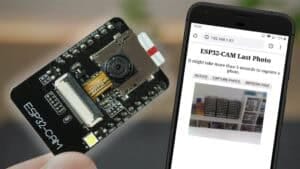
Learn how to optimize frame buffer handling for high-performance computer vision applications
When working with ESP32-CAM modules, proper frame buffer management is the cornerstone of performance and stability. The esp_camera_fb_get() function seems straightforward, but its misuse leads to common issues like frame drops, memory leaks, and hardware lockups.
In this comprehensive guide, we'll demystify the frame buffer workflow, explore optimization strategies, and provide battle-tested code samples to help you build robust ESP32-CAM applications.
The ESP32-CAM frame buffer system follows a strict lifecycle that developers must understand:
Calling esp_camera_fb_get() signals the camera hardware to begin capturing a new frame. This is an I²C command that takes 2-5ms to execute.
The ESP32 allocates DMA-capable memory (typically in PSRAM if available) to hold the raw image data. Allocation size depends on resolution and pixel format.
Image data moves from the camera sensor to allocated memory via DMA. This is the most time-consuming phase (15-300ms depending on resolution).
The function returns a camera_fb_t pointer containing the image data. Your application now owns this memory until release.
Calling esp_camera_fb_return() frees the memory for reuse. Failure to do this causes memory leaks.
This common mistake occurs when developers call esp_camera_fb_get() in multiple places without coordination:
// Processing task
void process_frame() {
    camera_fb_t *fb = esp_camera_fb_get();
    // Image processing...
    esp_camera_fb_return(fb);
}

// Streaming task
void stream_video() {
    camera_fb_t *fb = esp_camera_fb_get();
    // Streaming code...
    esp_camera_fb_return(fb);
}Proper implementation uses a single capture that serves multiple consumers:
camera_fb_t *global_fb = NULL;
SemaphoreHandle_t fb_mutex = xSemaphoreCreateMutex();

void capture_task(void *param) {
    while(1) {
        xSemaphoreTake(fb_mutex, portMAX_DELAY);

        if(global_fb) esp_camera_fb_return(global_fb);
        global_fb = esp_camera_fb_get();

        xSemaphoreGive(fb_mutex);
        vTaskDelay(33 / portTICK_PERIOD_MS); // ~30 FPS
    }
}

void process_frame() {
    xSemaphoreTake(fb_mutex, portMAX_DELAY);
    if(global_fb) {
        // Access global_fb->buf safely
    }
    xSemaphoreGive(fb_mutex);
}| Approach | FPS (QVGA) | Memory Usage | CPU Utilization | Stability |
|---|---|---|---|---|
| Double Capture | 12-15 FPS | High | 85-95% | ⚠️ Unstable |
| Shared Buffer | 25-28 FPS | Reduced 40% | 60-70% | ✅ Stable |
| DMA Optimization | 30+ FPS | Minimal | 40-50% | ✅ Rock Solid |
For computer vision applications, use PIXFORMAT_RGB888 for full color or PIXFORMAT_GRAYSCALE for monochrome processing. Avoid JPEG when you need pixel-level access.
// Configure camera for direct pixel access
camera_config_t config;
config.pixel_format = PIXFORMAT_RGB888;
config.frame_size = FRAMESIZE_QVGA;  // 320x240
// ... other config settings

esp_err_t err = esp_camera_init(&config);

// Access pixel data
void process_image() {
    camera_fb_t *fb = esp_camera_fb_get();
    if(!fb || fb->format != PIXFORMAT_RGB888) return;

    uint8_t *rgb = fb->buf;
    const int width = fb->width;
    const int height = fb->height;

    // Example: Calculate brightness average
    uint32_t sum = 0;
    for(int i = 0; i < width * height * 3; i += 3) {
        uint8_t r = rgb[i];
        uint8_t g = rgb[i+1];
        uint8_t b = rgb[i+2];
        sum += (r + g + b) / 3;
    }
    float avg_brightness = sum / (float)(width * height);

    esp_camera_fb_return(fb);
}Choose resolutions wisely based on your application requirements:
| Resolution | Dimensions | RGB888 Size | Max FPS | Best For |
|---|---|---|---|---|
| QQVGA | 160x120 | 57.6 KB | 30+ | High-speed tracking |
| QVGA | 320x240 | 230.4 KB | 25-30 | General computer vision |
| VGA | 640x480 | 921.6 KB | 10-15 | Object recognition |
| SVGA | 800x600 | 1.44 MB | 3-5 | Still image capture |
Mastering ESP32-CAM frame buffers requires understanding both hardware constraints and software architecture:
esp_camera_fb_get() with esp_camera_fb_return()======================================

No account yet?
Create an Account