
EMC/EMI Checklist Before Your Board Goes to Certification
EMC testing is expensive, and failing it is worse than the test fee — it costs you a respin, a
FreeRTOS ESP32 tutorial offers enthusiasts and developers a comprehensive guide to navigating the world of real-time operating systems on the popular ESP32 platform. As the demand for responsive and efficient applications rises, FreeRTOS has become a go-to choice for managing tasks and communication within embedded systems. This article will explore how to effectively utilize ESP32 FreeRTOS tasks and queues, helping you to build responsive applications with ease.
Before diving into the practical aspects, it’s vital to grasp the relationship between FreeRTOS and the ESP32. FreeRTOS is an open-source real-time operating system that provides developers with the ability to manage multiple tasks efficiently. The ESP32, a low-power, dual-core microcontroller with integrated Wi-Fi and Bluetooth, is ideally suited for projects requiring sophisticated multitasking capabilities.
Using FreeRTOS on the ESP32 unlocks several advantages:
1. Multitasking: It allows you to run multiple tasks concurrently, making your applications more responsive.
2. Inter-task Communication: FreeRTOS provides mechanisms such as queues and semaphores to facilitate communication between tasks.
3. Resource Management: Efficiently manage CPU power and resources, ensuring that your applications run smooth and optimized.
Before you can start working on tasks and queues, you need to set up the appropriate development environment.
1. Arduino IDE: Ideal for beginners, the Arduino IDE provides a simple interface to write, compile, and upload your code.
2. ESP32 Board: Make sure you have the ESP32 development board.
3. FreeRTOS Library: This usually comes bundled with the ESP32 board package when you install the board through the Arduino IDE.
1. Open the Arduino IDE and go to File > Preferences.
2. In the “Additional Board Manager URLs” field, add the ESP32 board URL, which can be found in many online resources.
3. Next, navigate to Tools > Board > Board Manager and search for “ESP32” to install the relevant board definitions.
Now that your environment is set up, let’s create a simple task. A task in FreeRTOS is a function that runs independently and can be scheduled by the operating system.
Here’s a basic example to create and run a task:
```cpp
#include
void TaskBlink(void pvParameters) {
for (;;) {
Serial.println("Task is blinking!");
digitalWrite(LED_BUILTIN, HIGH);
vTaskDelay(1000 / portTICK_PERIOD_MS);
digitalWrite(LED_BUILTIN, LOW);
vTaskDelay(1000 / portTICK_PERIOD_MS);
}
}
void setup() {
Serial.begin(115200);
pinMode(LED_BUILTIN, OUTPUT);
xTaskCreate(TaskBlink, "Blink Task", 1024, NULL, 1, NULL);
}
void loop() {
// The loop function runs continuously, but our task is managed by FreeRTOS.
}
```
1. Task Function: `TaskBlink` is defined to print a message and toggle an LED pin.
2. Task Creation: `xTaskCreate` is where you create the task, specifying its function, name, stack size, parameters, priority, and a task handle.
3. Loop Function: The main `loop()` is left empty because the task manages its execution through FreeRTOS.
Queues are fundamental in FreeRTOS for sending data between tasks. This helps maintain synchronization and ensures tasks operate without conflicts.
Here's how to implement a queue in your FreeRTOS ESP32 application:
```cpp
#include
QueueHandle_t myQueue;
void TaskSender(void pvParameters) {
int count = 0;
for (;;) {
xQueueSend(myQueue, &count, portMAX_DELAY);
Serial.printf("Sent: %dn", count);
count++;
vTaskDelay(1000 / portTICK_PERIOD_MS);
}
}
void TaskReceiver(void *pvParameters) {
int receivedValue;
for (;;) {
if (xQueueReceive(myQueue, &receivedValue, portMAX_DELAY) == pdPASS) {
Serial.printf("Received: %dn", receivedValue);
}
}
}
void setup() {
Serial.begin(115200);
myQueue = xQueueCreate(5, sizeof(int));
xTaskCreate(TaskSender, "Sender Task", 1024, NULL, 1, NULL);
xTaskCreate(TaskReceiver, "Receiver Task", 1024, NULL, 1, NULL);
}
void loop() {
// The loop function remains unoccupied as well.
}
```
1. Queue Creation: `myQueue` is created to hold five integer values.
2. Sender and Receiver Tasks: Two tasks are created—one for sending and another for receiving messages through the queue.
3. Delay and Synchronization: The tasks communicate data while maintaining efficient operation without causing delays or data loss.
The FreeRTOS ESP32 tutorial equips you with the fundamental knowledge to manage tasks and queues effectively on the ESP32 platform. By leveraging the capabilities of FreeRTOS, you can create robust applications that efficiently utilize resources, enhance performance, and improve user experience. Whether you're working on IoT projects, sensors, or smart home devices, understanding how to implement and manage tasks and queues in FreeRTOS is a crucial skill in your developer toolkit. Dive in, experiment, and see how FreeRTOS can elevate your ESP32 projects!
======================================
 Radxa USB-C to DC 5521 Power Cable for 30W PD Power Supplies
$4.90
Radxa USB-C to DC 5521 Power Cable for 30W PD Power Supplies
$4.90
 Zigbee Smart Dimmer Switch Module Supports 2 Way Control LED Lights Dimmable Switch Work with Alexa Google Home Need Hub
 4.2 Inch Black White Epaper Display
$11.80
4.2 Inch Black White Epaper Display
$11.80
 3.3V 16*2 Character LCD Display LCM 1602 16X2 162 Screen HD44780 Yellow/Blue/Gray Color For 51 STM32 R3
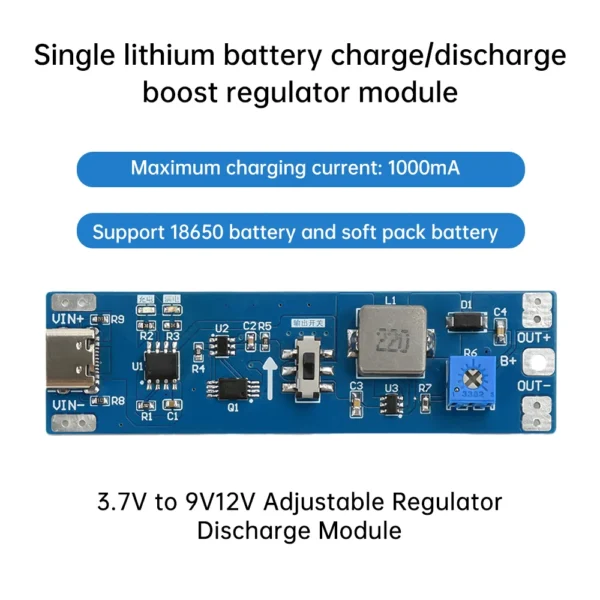 3.7V to 9V 12V 18650 Lithium Battery Boost Step Up Module UPS Uninterruptible Power Supply Module Charge Discharge Integrated
$2.50 – $3.50Price range: $2.50 through $3.50
3.7V to 9V 12V 18650 Lithium Battery Boost Step Up Module UPS Uninterruptible Power Supply Module Charge Discharge Integrated
$2.50 – $3.50Price range: $2.50 through $3.50
EMC testing is expensive, and failing it is worse than the test fee — it costs you a respin, a
We review a lot of boards — some designed in-house, some by other contractors, some by founders doing their own
When a battery-powered product dies too soon, the instinct is to blame the firmware. Surely there is a sleep mode
A wearable PCB is not just a small PCB. It is a board where every constraint that normally has some
The STM32 family is the workhorse of embedded hardware, and almost every project that uses one starts the same way:
The nRF52840 is one of the most popular BLE and multiprotocol chips in the world, and for good reason: it
No account yet?
Create an Account